
Step 6: Add a memo
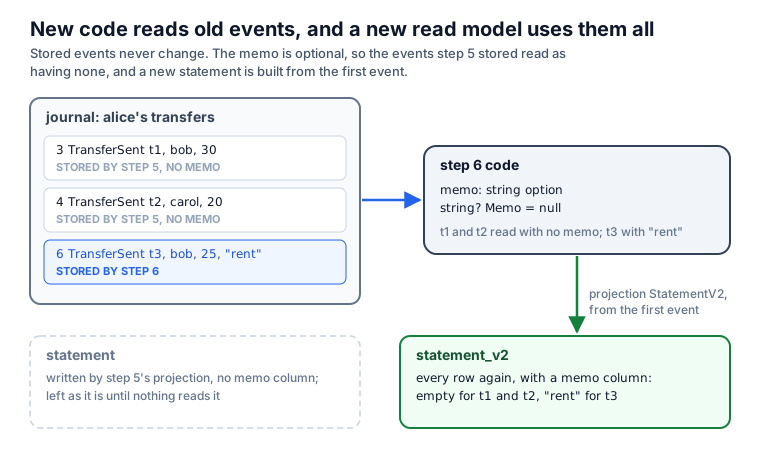
Alice wants to say why she sends money: a memo on each transfer. The transfers that step 5 stored have no memo, and they stay in the journal as they are, because FCQRS never rewrites a stored event. This step changes the events so that the new code reads the old ones, and it rebuilds the statement with a memo column.
The same change in a CRUD application
A CRUD application adds a column, and the existing rows get NULL:
ALTER TABLE transactions ADD COLUMN memo TEXT;
The journal cannot change that way. A stored event records what happened, and nothing rewrites it, so every later version of the program must read it as it was stored. Adding an optional field is a change of that kind: an old event reads as a transfer without a memo.
Continue from step 5
Shared setup
open System
open System.IO
SystemIO// This step is the bank's next release. On its first run, it copies the
// database step 5 wrote, so its journal starts with events without a memo.
let database = Path.Combine(AppContext.BaseDirectory, "accounts.db")
if not (File.Exists database) then
// Step 5 builds into the same folder layout next to this step.
let previous =
AppContext.BaseDirectory.Replace("6-add-a-memo", "5-transfer-money")
let step5 = Path.Combine(previous, "accounts.db")
if not (File.Exists step5) then
eprintfn "Run step 5 first: this step continues from its database."
exit 1
File.Copy(step5, database)
database: stringSystem.IO.PathPerforms operations on instances that contain file or directory path information. These operations are performed in a cross-platform manner.
Combine: string * string -> stringCombines two strings into a path. The first path to combine. The second path to combine. .NET Framework and .NET Core versions older than 2.1: or contains one or more of the invalid characters defined in . or is . The combined paths. If one of the specified paths is a zero-length string, this method returns the other path. If contains an absolute path, this method returns .
System.AppContextProvides members for setting and retrieving data about an application's context.
BaseDirectory: stringGets the file path of the base directory that the assembly resolver uses to probe for assemblies. The file path of the base directory that the assembly resolver uses to probe for assemblies.
``not``: bool -> boolNegate a logical value. Not True equals False and not False equals True The value to negate. The result of the negation. not (2 + 2 = 5) // Evaluates to true // not is a function that can be compose with other functions let fileDoesNotExist = System.IO.File.Exists >> not
System.IO.FileProvides static methods for the creation, copying, deletion, moving, and opening of a single file, and aids in the creation of objects.
Exists: string -> boolDetermines whether the specified file exists. The file to check. if the caller has the required permissions and contains the name of an existing file; otherwise, . This method also returns if is , an invalid path, or a zero-length string. If the caller does not have sufficient permissions to read the specified file, no exception is thrown and the method returns regardless of the existence of .
previous: stringReplace: string * string -> stringstep5: stringeprintfn: Printf.TextWriterFormat<'T> -> 'TPrint to stderr using the given format, and add a newline. The formatter. The formatted result. See Printf.eprintfn (link: ) for examples.
exit: int -> 'TExit the current hardware isolated process, if security settings permit, otherwise raise an exception. Calls . The exit code to use. Never returns. [<EntryPoint>] let main argv = if argv.Length = 0 then eprintfn "You must provide arguments" exit(-1) // Causes program to quit with an error code printfn "Argument count: %i" argv.Length 0
Copy: string * string -> unitCopies an existing file to a new file. Overwriting a file of the same name is not allowed. The file to copy. The name of the destination file. This cannot be a directory or an existing file. The caller does not have the required permission. or is a zero-length string, contains only white space, or contains one or more invalid characters. You can query for invalid characters by using the method. -or- or specifies a directory. or is . The specified path, file name, or both exceed the system-defined maximum length. The path specified in or is invalid (for example, it is on an unmapped drive). was not found. exists. -or- An I/O error has occurred. or is in an invalid format.
// This step is the bank's next release. On its first run, it copies the
// database step 5 wrote, so its journal starts with events without a memo.
var database = Path.Combine(AppContext.BaseDirectory, "accounts.db");
if (!File.Exists(database))
{
    // Step 5 builds into the same folder layout next to this step.
    var previous =
        AppContext.BaseDirectory.Replace("6-add-a-memo", "5-transfer-money");
    var step5 = Path.Combine(previous, "accounts.db");
    if (!File.Exists(step5))
    {
        Console.Error.WriteLine(
            "Run step 5 first: this step continues from its database.");
        return 1;
    }
    File.Copy(step5, database);
}
This program is the bank's next release, so it starts from the history step 5 wrote. The journal stores each event with the name of its type, including the assembly it came from:
FCQRS.Common+Event`1[[Account+AccountEvent, Accounts, ...]], FCQRS, ...
Steps 5 and 6 both build an assembly named Accounts (the AssemblyName in their project files), and
both declare AccountEvent in the same place, so step 6 can read what step 5 stored. Renaming the event
type, moving it, or renaming the assembly would leave the old rows unreadable. Before such a change,
give the type a stable journal name, as Evolve persisted events shows.
Add the memo
module Account

open FCQRS.Common

// What a caller, or the transfer saga, can ask an account to do.
type AccountCommand =
    | Open of owner: string
    | Deposit of amount: decimal
    | Withdraw of amount: decimal
    // New in this step: an optional memo, which the saga passes to the target.
    | SendTransfer of
        transferId: string * target: string * amount: decimal *
        memo: string option
    | ReceiveTransfer of
        transferId: string * source: string * amount: decimal *
        memo: string option
    | RefundTransfer of transferId: string * target: string * amount: decimal

// What the account replies. Rejected is a reply only: it is never stored.
type AccountEvent =
    | Opened of owner: string
    | Deposited of amount: decimal
    | Withdrawn of amount: decimal
    // Events stored before this step have no memo, so it is optional:
    // reading them gives None.
    | TransferSent of
        transferId: string * target: string * amount: decimal *
        memo: string option
    | TransferReceived of
        transferId: string * source: string * amount: decimal *
        memo: string option
    | TransferRefunded of transferId: string * target: string * amount: decimal
    | Rejected of reason: string

// What the account knows now. The sets hold the IDs of transfers it has
// handled, so a repeated transfer command moves no money twice.
type AccountState =
    { Owner: string option
      Balance: decimal
      Sent: Set<string>
      Received: Set<string>
      Refunded: Set<string> }

// The state before the account's first event.
let initial =
    { Owner = None
      Balance = 0m
      Sent = Set.empty
      Received = Set.empty
      Refunded = Set.empty }
Fcqrs_250-tutorial_006-add-a-memo.md_page.AccountFCQRSFCQRS.CommonContains common types like Events and Commands Functionality for Write Side.
Fcqrs_250-tutorial_006-add-a-memo.md_page.Account.AccountCommandOpenowner: stringstringAn abbreviation for the CLI type . Basic Types
Depositamount: decimaldecimalAn abbreviation for the CLI type . Basic Types
WithdrawSendTransfertransferId: stringtarget: stringmemo: string optionoptionThe type of optional values. When used from other CLI languages the empty option is the null value. Use the constructors Some and None to create values of this type. Use the values in the Option module to manipulate values of this type, or pattern match against the values directly. 'None' values will appear as the value null to other CLI languages. Instance methods on this type will appear as static methods to other CLI languages due to the use of null as a value representation. Options
ReceiveTransfersource: stringRefundTransferFcqrs_250-tutorial_006-add-a-memo.md_page.Account.AccountEventOpenedDepositedWithdrawnTransferSentTransferReceivedTransferRefundedRejectedreason: stringFcqrs_250-tutorial_006-add-a-memo.md_page.Account.AccountStateOwner: string optionBalance: decimalSent: Set<string>Microsoft.FSharp.Collections.FSharpSet`1Immutable sets based on binary trees, where elements are ordered by F# generic comparison. By default comparison is the F# structural comparison function or uses implementations of the IComparable interface on element values. See the module for further operations on sets. All members of this class are thread-safe and may be used concurrently from multiple threads.
Received: Set<string>Refunded: Set<string>initial: AccountStateNoneThe representation of "No value"
Microsoft.FSharp.Collections.SetModuleContains operations for working with values of type .
empty: Set<'T>The empty set for the type 'T. Set.empty<int> Evaluates to set [ ].
// What a caller, or the transfer saga, can ask an account to do.
public union AccountCommand(
    Open, Deposit, Withdraw, SendTransfer, ReceiveTransfer, RefundTransfer);
public sealed record Open(string Owner);
public sealed record Deposit(decimal Amount);
public sealed record Withdraw(decimal Amount);
// New in this step: an optional memo, which the saga passes to the target.
public sealed record SendTransfer(
    string TransferId, string Target, decimal Amount, string? Memo = null);
public sealed record ReceiveTransfer(
    string TransferId, string Source, decimal Amount, string? Memo = null);
public sealed record RefundTransfer(
    string TransferId, string Target, decimal Amount);

// What the account replies. Rejected is a reply only: it is never stored.
public union AccountEvent(
    Opened, Deposited, Withdrawn,
    TransferSent, TransferReceived, TransferRefunded, Rejected);
public sealed record Opened(string Owner);
public sealed record Deposited(decimal Amount);
public sealed record Withdrawn(decimal Amount);
// Events stored before this step have no memo, so it is optional:
// reading them gives null.
public sealed record TransferSent(
    string TransferId, string Target, decimal Amount, string? Memo = null);
public sealed record TransferReceived(
    string TransferId, string Source, decimal Amount, string? Memo = null);
public sealed record TransferRefunded(
    string TransferId, string Target, decimal Amount);
public sealed record Rejected(string Reason);

// What the account knows now. The sets hold the IDs of transfers it has
// handled, so a repeated transfer command moves no money twice.
public sealed record AccountState(
    string? Owner,
    decimal Balance,
    ImmutableHashSet<string> Sent,
    ImmutableHashSet<string> Received,
    ImmutableHashSet<string> Refunded);
The events stored before this step have no memo, so the new field is optional: string option in F#,
and a parameter with the default null in C#. An old TransferSent reads with no memo. In F#, a new
field that is not an option would make every old TransferSent unreadable.
The other parts of an event stay as they are: its case name, its field names, and the meaning of each field are all stored, and step 5's events use them.
// Chooses what to do with a command, based on the current state.
let decide (command: Command<AccountCommand>) (state: AccountState) =
    match command.CommandDetails, state.Owner with
    | Open _, Some _ -> DeferEvent(Rejected "The account is already open")
    | Open owner, None -> PersistEvent(Opened owner)
    | _, None -> DeferEvent(Rejected "The account is not open")
    | (Deposit amount | Withdraw amount | SendTransfer(_, _, amount, _)), _
        when amount <= 0m -> DeferEvent(Rejected "The amount must be positive")
    | Deposit amount, _ -> PersistEvent(Deposited amount)
    | (Withdraw amount | SendTransfer(_, _, amount, _)), _
        when amount > state.Balance ->
        DeferEvent(Rejected $"Insufficient funds: {state.Balance} available")
    | Withdraw amount, _ -> PersistEvent(Withdrawn amount)
    | SendTransfer(id, _, _, _), _ when state.Sent.Contains id ->
        DeferEvent(Rejected $"Transfer {id} was already sent")
    | SendTransfer(id, target, amount, memo), _ ->
        PersistEvent(TransferSent(id, target, amount, memo))
    // A repeated delivery gets the first answer; no money moves.
    | ReceiveTransfer(id, source, amount, memo), _
        when state.Received.Contains id ->
        DeferEvent(TransferReceived(id, source, amount, memo))
    | ReceiveTransfer(id, source, amount, memo), _ ->
        PersistEvent(TransferReceived(id, source, amount, memo))
    | RefundTransfer(id, target, amount), _ when state.Refunded.Contains id ->
        DeferEvent(TransferRefunded(id, target, amount))
    | RefundTransfer(id, target, amount), _ ->
        PersistEvent(TransferRefunded(id, target, amount))

// Applies one event. A rejection or a repeated reply changes nothing.
let fold (event: Event<AccountEvent>) (state: AccountState) =
    match event.EventDetails with
    | Opened owner -> { state with Owner = Some owner }
    | Deposited amount -> { state with Balance = state.Balance + amount }
    | Withdrawn amount -> { state with Balance = state.Balance - amount }
    | TransferSent(id, _, amount, _) ->
        { state with
            Balance = state.Balance - amount
            Sent = state.Sent.Add id }
    // FCQRS folds a repeated reply too; a known ID changes nothing.
    | TransferReceived(id, _, _, _) when state.Received.Contains id -> state
    | TransferReceived(id, _, amount, _) ->
        { state with
            Balance = state.Balance + amount
            Received = state.Received.Add id }
    | TransferRefunded(id, _, _) when state.Refunded.Contains id -> state
    | TransferRefunded(id, _, amount) ->
        { state with
            Balance = state.Balance + amount
            Refunded = state.Refunded.Add id }
    | Rejected _ -> state
decide: Command<AccountCommand> -> AccountState -> EventAction<AccountEvent>command: Command<AccountCommand>FCQRS.Common.Command`1Represents a command to be processed by an aggregate actor. <typeparam name="'CommandDetails">The specific type of the command payload.</typeparam>
Fcqrs_250-tutorial_006-add-a-memo.md_page.Account.AccountCommandstate: AccountStateFcqrs_250-tutorial_006-add-a-memo.md_page.Account.AccountStateCommandDetails: 'CommandDetailsThe specific details or payload of the command.
Owner: string optionOpenSomeThe representation of "Value of type 'T" The input value. An option representing the value.
DeferEventPublish and fold the event in the live actor without storing it or incrementing the persisted version. A deferred event does not start a saga; running sagas still receive it.
Rejectedowner: stringNoneThe representation of "No value"
PersistEventPersist the event to the journal. The actor's state will be updated using the event handler *after* persistence succeeds.
OpenedDepositamount: decimalWithdrawSendTransfer(<=): 'T -> 'T -> boolStructural less-than-or-equal comparison The first parameter. The second parameter. The result of the comparison. 5 <= 1 // Evaluates to false 5 <= 5 // Evaluates to true [1; 5] <= [1; 6] // Evaluates to true
Deposited(>): 'T -> 'T -> boolStructural greater-than The first parameter. The second parameter. The result of the comparison. 5 > 1 // Evaluates to true 5 > 5 // Evaluates to false (1, "a") > (1, "z") // Evaluates to false
Balance: decimalWithdrawnid: stringContains: string -> boolA useful shortcut for Set.contains. See the Set module for further operations on sets. The value to check. True if the set contains value. let set = Set.empty.Add(2).Add(3) printfn $"Does the set contain 1? {set.Contains(1)}" The sample evaluates to the following output: Does the set contain 1? false
Sent: Set<string>target: stringmemo: string optionTransferSentReceiveTransfersource: stringReceived: Set<string>TransferReceivedRefundTransferRefunded: Set<string>TransferRefundedfold: Event<AccountEvent> -> AccountState -> AccountStateevent: Event<AccountEvent>FCQRS.Common.Event`1Represents an event generated by an aggregate actor as a result of processing a command. <typeparam name="'EventDetails">The specific type of the event payload.</typeparam>
Fcqrs_250-tutorial_006-add-a-memo.md_page.Account.AccountEventEventDetails: 'EventDetailsThe specific details or payload of the event.
(-): ^T1 -> ^T2 -> ^T3Overloaded subtraction operator The first parameter. The second parameter. The result of the operation. 10 - 2 // Evaluates to 8
Add: string -> Set<string>A useful shortcut for Set.add. Note this operation produces a new set and does not mutate the original set. The new set will share many storage nodes with the original. See the Set module for further operations on sets. The value to add to the set. The result set. let set = Set.empty.Add(1).Add(1).Add(2) printfn $"The new set is: {set}" The sample evaluates to the following output: The new set is: set [1; 2]
(+): ^T1 -> ^T2 -> ^T3Overloaded addition operator The first parameter. The second parameter. The result of the operation. 2 + 2 // Evaluates to 4 "Hello " + "World" // Evaluates to "Hello World"
public sealed class Account
    : Aggregate<AccountState, AccountCommand, AccountEvent>
{
    // The name stored with every event of this aggregate.
    public override string EntityName => "Account";
    // The state before the account's first event.
    public override AccountState InitialState => new(null, 0m, [], [], []);

    // Chooses what to do with a command, based on the current state.
    public override EventAction<AccountEvent> HandleCommand(
        Command<AccountCommand> command, AccountState state) =>
        (command.CommandDetails, state.Owner) switch
        {
            (Open, not null) => Reject("The account is already open"),
            (Open open, null) => Store(new Opened(open.Owner)),
            (_, null) => Reject("The account is not open"),
            (Deposit { Amount: <= 0m } or Withdraw { Amount: <= 0m }
                or SendTransfer { Amount: <= 0m }, _) =>
                Reject("The amount must be positive"),
            (Deposit deposit, _) => Store(new Deposited(deposit.Amount)),
            (Withdraw withdraw, _) when withdraw.Amount > state.Balance =>
                Reject($"Insufficient funds: {state.Balance} available"),
            (SendTransfer send, _) when send.Amount > state.Balance =>
                Reject($"Insufficient funds: {state.Balance} available"),
            (Withdraw withdraw, _) => Store(new Withdrawn(withdraw.Amount)),
            (SendTransfer send, _) when state.Sent.Contains(send.TransferId) =>
                Reject($"Transfer {send.TransferId} was already sent"),
            (SendTransfer send, _) => Store(new TransferSent(
                send.TransferId, send.Target, send.Amount, send.Memo)),
            // A repeated delivery gets the first answer; no money moves.
            (ReceiveTransfer receive, _)
                when state.Received.Contains(receive.TransferId) =>
                Repeat(new TransferReceived(receive.TransferId,
                    receive.Source, receive.Amount, receive.Memo)),
            (ReceiveTransfer receive, _) =>
                Store(new TransferReceived(receive.TransferId,
                    receive.Source, receive.Amount, receive.Memo)),
            (RefundTransfer refund, _)
                when state.Refunded.Contains(refund.TransferId) =>
                Repeat(new TransferRefunded(
                    refund.TransferId, refund.Target, refund.Amount)),
            (RefundTransfer refund, _) =>
                Store(new TransferRefunded(
                    refund.TransferId, refund.Target, refund.Amount))
        };

    // Applies one event. A rejection or a repeated reply changes nothing.
    public override AccountState ApplyEvent(
        Event<AccountEvent> stored, AccountState state) =>
        stored.EventDetails switch
        {
            Opened opened => state with { Owner = opened.Owner },
            Deposited deposited =>
                state with { Balance = state.Balance + deposited.Amount },
            Withdrawn withdrawn =>
                state with { Balance = state.Balance - withdrawn.Amount },
            TransferSent sent => state with
            {
                Balance = state.Balance - sent.Amount,
                Sent = state.Sent.Add(sent.TransferId)
            },
            // FCQRS folds a repeated reply too; a known ID changes nothing.
            TransferReceived received
                when state.Received.Contains(received.TransferId) => state,
            TransferReceived received => state with
            {
                Balance = state.Balance + received.Amount,
                Received = state.Received.Add(received.TransferId)
            },
            TransferRefunded refunded
                when state.Refunded.Contains(refunded.TransferId) => state,
            TransferRefunded refunded => state with
            {
                Balance = state.Balance + refunded.Amount,
                Refunded = state.Refunded.Add(refunded.TransferId)
            },
            Rejected => state
        };

    // Stores the event and replies with it.
    static EventAction<AccountEvent> Store(AccountEvent @event) =>
        EventActions.Persist(@event);

    // Replies without storing anything.
    static EventAction<AccountEvent> Reject(string reason) =>
        EventActions.Defer<AccountEvent>(new Rejected(reason));

    // Replies with an earlier answer again, without storing it.
    static EventAction<AccountEvent> Repeat(AccountEvent @event) =>
        EventActions.Defer(@event);
}
The rules only pass the memo along. The saga passes it too: its TransferDetails gets an optional
Memo for the same reason, because step 5's sagas stored their states without one.
Rebuild the statement with a memo column
Shared setup
module Transfer =
    open System
    open FCQRS.Common
    open FCQRS.FSharp
    open Account

    // What a transfer moves, and between which accounts.
    type TransferDetails =
        { Id: string
          Source: string
          Target: string
          Amount: decimal
          // New in this step. Transfers stored before it have none.
          Memo: string option }

    // Where a transfer is.
    type TransferState =
        // Waiting for the target account to take the money.
        | Delivering of TransferDetails
        // The target turned it down: waiting for the source account's refund.
        | Refunding of TransferDetails
        | Completed

    // Turns an event into the next state to store.
    let handleEvent (message: obj) (saga: SagaState<unit, TransferState option>) =
        match message, saga.State with
        | (:? Event<AccountEvent> as event), state ->
            // Sender is the ID of the account that stored the event.
            let sender = string event.Sender.Value
            match event.EventDetails, state with
            | TransferSent(id, target, amount, memo), None ->
                let transfer =
                    { Id = id
                      Source = sender
                      Target = target
                      Amount = amount
                      Memo = memo }
                StateChangedEvent(Delivering transfer)
            | TransferReceived(id, _, _, _), Some(Delivering transfer)
                when id = transfer.Id -> StateChangedEvent Completed
            | Rejected _, Some(Delivering transfer) when sender = transfer.Target ->
                StateChangedEvent(Refunding transfer)
            | TransferRefunded(id, _, _), Some(Refunding transfer)
                when id = transfer.Id -> StateChangedEvent Completed
            | _ -> UnhandledEvent
        // No answer in time. The outcome is unknown, so enter the same state again,
        // which sends the command again.
        | :? ExpectationExhausted, Some(Delivering _ | Refunding _ as waiting) ->
            StateChangedEvent waiting
        | _ -> UnhandledEvent

    // Returns the commands for a stored state. It runs again after recovery; the
    // last argument says whether FCQRS is recovering, and this saga ignores it.
    let applySideEffects accounts (saga: SagaState<unit, TransferState>) _ =
        // Send now and every 5 seconds; after 30 seconds, tell handleEvent.
        let deliver command =
            let retry = FixedInterval(TimeSpan.FromSeconds 5.)
            expecting (TimeSpan.FromSeconds 30.) retry [ command ], []
        match saga.State with
        | Delivering transfer ->
            let command =
                ReceiveTransfer(
                    transfer.Id, transfer.Source, transfer.Amount, transfer.Memo)
            deliver (toAggregate accounts transfer.Target command)
        | Refunding transfer ->
            let command =
                RefundTransfer(transfer.Id, transfer.Target, transfer.Amount)
            deliver (toOriginator accounts command)
        | Completed -> StopSaga, []

    // A transfer starts when an account stores TransferSent.
    let startsOn (event: Event<AccountEvent>) =
        match event.EventDetails with
        | TransferSent _ -> true
        | _ -> false

    let definition accounts =
        { Name = "Transfer"
          InitialData = ()
          Originator = accounts
          HandleEvent = handleEvent
          ApplySideEffects = applySideEffects accounts
          StartOn = startsOn
          Snapshots = Default }
module Statement =
    open System.Data.Common
    open System.Threading.Tasks
    open Akka.Persistence.Query
    open Dapper
    open FCQRS.Common
    open Account
Fcqrs_250-tutorial_006-add-a-memo.md_page.TransferSystemFCQRSFCQRS.CommonContains common types like Events and Commands Functionality for Write Side.
FCQRS.FSharpIdiomatic-F# functional facade for FCQRS. Gives F# consumers the same one-call ergonomics the C# host-builder (HostExtensions.fs) gives C#, but with F# idioms: records-of-functions for the definitions, typed handles for the results, an explicit wiring pipeline, and plain helpers for saga side effects. It is a *pure addition* that wraps only the existing primitives (IActor.InitializeActor / SagaBuilder.initSimple / Projections.startTracked / InitializeSagaStarter / CreateCommandSubscription / Actor.api) and changes nothing in the C# interop layer or the core. open FCQRS.FSharp let api = Fcqrs.actor config loggerFactory (Some (Fcqrs.connect DBType.Sqlite conn)) "Cluster" let documents = Fcqrs.aggregate api { Name="Document"; Initial=...; Decide=...; Fold=... } let slugs = Fcqrs.aggregate api { Name="Slug"; Initial=...; Decide=...; Fold=... } let publication = Fcqrs.saga api (publicationDef documents.Factory slugs.Factory) Fcqrs.wireSagaStarters api [ publication ] let subs = Fcqrs.projection api (Projection.single 0 updateReadModel) // (Projection.multi when you must control which notifications publish) // send a command and await the matching aggregate reply: let! ev = documents.Send (Fcqrs.newCid()) (Fcqrs.aggregateId id) cmd (fun e -> ...)
Fcqrs_250-tutorial_006-add-a-memo.md_page.AccountFcqrs_250-tutorial_006-add-a-memo.md_page.Transfer.TransferDetailsId: stringstringAn abbreviation for the CLI type . Basic Types
Source: stringTarget: stringAmount: decimaldecimalAn abbreviation for the CLI type . Basic Types
Memo: string optionoptionThe type of optional values. When used from other CLI languages the empty option is the null value. Use the constructors Some and None to create values of this type. Use the values in the Option module to manipulate values of this type, or pattern match against the values directly. 'None' values will appear as the value null to other CLI languages. Instance methods on this type will appear as static methods to other CLI languages due to the use of null as a value representation. Options
Fcqrs_250-tutorial_006-add-a-memo.md_page.Transfer.TransferStateDeliveringRefundingCompletedhandleEvent: obj -> SagaState<unit,TransferState option> -> EventAction<TransferState>message: objobjAn abbreviation for the CLI type . Basic Types
saga: SagaState<unit,TransferState option>FCQRS.Common.SagaState`2Represents the state of a saga instance. <typeparam name="'SagaData">The type of the custom data held by the saga.</typeparam> <typeparam name="'State">The type representing the saga's current state machine state (e.g., an enum or DU).</typeparam>
unitThe type 'unit', which has only one value "()". This value is special and always uses the representation 'null'. Basic Types
State: 'StateThe current state machine state of the saga.
FCQRS.Common.Event`1Represents an event generated by an aggregate actor as a result of processing a command. <typeparam name="'EventDetails">The specific type of the event payload.</typeparam>
Fcqrs_250-tutorial_006-add-a-memo.md_page.Account.AccountEventevent: Event<AccountEvent>state: TransferState optionsender: stringstring: 'T -> stringConverts the argument to a string using ToString. For standard integer and floating point values and any type that implements IFormattable, ToString conversion uses CultureInfo.InvariantCulture. The input value. The converted string. string 'A' // evaluates to "A" string 0xff // evaluates to "255" string -10 // evaluates to "-10"
Value: FCQRS.Model.Data.AggregateIdGet the value of a 'Some' option. A NullReferenceException is raised if the option is 'None'.
Sender: FCQRS.Model.Data.AggregateId optionAn optional identifier for the actor that generated the event.
EventDetails: 'EventDetailsThe specific details or payload of the event.
TransferSentid: stringtarget: stringamount: decimalmemo: string optionNoneThe representation of "No value"
transfer: TransferDetailsStateChangedEventIndicate that the state of a saga has changed (used internally by sagas for persistence).
TransferReceivedSomeThe representation of "Value of type 'T" The input value. An option representing the value.
(=): 'T -> 'T -> boolStructural equality The first parameter. The second parameter. The result of the comparison. 5 = 5 // Evaluates to true 5 = 6 // Evaluates to false [1; 2] = [1; 2] // Evaluates to true (1, 5) = (1, 6) // Evaluates to false
RejectedTransferRefundedUnhandledEventIndicate that the command or event could not be handled in the current state.
FCQRS.Common.ExpectationExhaustedDelivered to the saga's event handler when an expectation's deadline has passed without a state transition. The handler must match this type and answer with a state change (typically to a domain failure or compensation state). An unhandled exhaustion is logged as an error and re-delivered one deadline period later; the framework never invents a terminal state. The original reply may still arrive after exhaustion — the escalated state's handler should decide what a late success means.
waiting: TransferStateapplySideEffects: AggregateFactory -> SagaState<unit,TransferState> -> 'a -> SagaTransition<'b> * 'c listaccounts: AggregateFactorysaga: SagaState<unit,TransferState>deliver: ExecuteCommand -> SagaTransition<'d> * 'e listcommand: ExecuteCommandretry: RetryScheduleFixedIntervalRe-send at a fixed interval.
System.TimeSpanRepresents a time interval.
FromSeconds: float -> TimeSpanReturns a that represents a specified number of seconds, where the specification is accurate to the nearest millisecond. A number of seconds, accurate to the nearest millisecond. is less than TimeSpan.MinValue or greater than TimeSpan.MaxValue. -or- is . -or- is . is equal to . An object that represents .
expecting: TimeSpan -> RetrySchedule -> ExecuteCommand list -> SagaTransition<'State>Declare a saga expectation: stay in this state, send `resend` now, re-send exactly those commands on `retryEvery`, and once `deadline` (measured from the persisted state-entry time, so restarts cannot postpone it) has passed without a state transition, deliver an ExpectationExhausted message to HandleEvent. The handler must answer it with a transition, typically to a failure or compensation state. Resend commands must be retry-safe and must not carry their own DelayInMs.
command: AccountCommandReceiveTransfertoAggregate: AggregateFactory -> string -> obj -> ExecuteCommandSend a command to a specific aggregate instance by id (cross-aggregate).
RefundTransfertoOriginator: AggregateFactory -> obj -> ExecuteCommandSend a command back to the saga's originator aggregate.
StopSagaThe saga should stop and terminate
startsOn: Event<AccountEvent> -> booldefinition: AggregateFactory -> Saga<unit,TransferState,AccountEvent>Name: stringInitialData: 'DataOriginator: AggregateFactoryThe aggregate the saga starts from (its commands' Originator target).
HandleEvent: obj -> SagaState<'Data,'State option> -> EventAction<'State>ApplySideEffects: SagaState<'Data,'State> -> bool -> SagaTransition<'State> * ExecuteCommand listStartOn: Event<'OriginatorEvent> -> boolWhich originator events spawn an instance of this saga. Typed to the originator's event so 'OriginatorEvent is inferred from the definition; there is no type argument to remember (or to get silently wrong).
Snapshots: SnapshotPolicySnapshot cadence: Default (config / 30), NoSnapshots, or Every n.
DefaultUse the global config (config:akka:persistence:snapshot-version-count), or 30.
Fcqrs_250-tutorial_006-add-a-memo.md_page.StatementDataCommonThreadingTasksAkkaPersistenceQueryDapper// A new read model with a memo column. It is a new table, so the projection
// fills it from the first event in the journal.
let createTable (connection: DbConnection) =
connection.Execute
"CREATE TABLE IF NOT EXISTS statement_v2 (
account TEXT NOT NULL,
version INTEGER NOT NULL,
entry TEXT NOT NULL,
memo TEXT,
amount NUMERIC NOT NULL,
balance NUMERIC NOT NULL,
PRIMARY KEY (account, version))"
|> ignore
createTable: DbConnection -> unitconnection: DbConnectionSystem.Data.Common.DbConnectionDefines the core behavior of database connections and provides a base class for database-specific connections.
Execute: string * obj * Data.IDbTransaction * Nullable<int> * Nullable<Data.CommandType> -> intExecute parameterized SQL. The connection to query on. The SQL to execute for this query. The parameters to use for this query. The transaction to use for this query. Number of seconds before command execution timeout. Is it a stored proc or a batch? The number of rows affected.
(|>): 'T1 -> ('T1 -> 'U) -> 'UApply a function to a value, the value being on the left, the function on the right The argument. The function. The function result. let doubleIt x = x * 2 3 |> doubleIt // Evaluates to 6
ignore: 'T -> unitIgnore the passed value. This is often used to throw away results of a computation. The value to ignore. ignore 55555 // Evaluates to ()
// A new read model with a memo column. It is a new table, so the projection
// fills it from the first event in the journal.
public static void CreateTable(DbConnection connection) =>
    connection.Execute(
        """
        CREATE TABLE IF NOT EXISTS statement_v2 (
            account TEXT NOT NULL,
            version INTEGER NOT NULL,
            entry TEXT NOT NULL,
            memo TEXT,
            amount NUMERIC NOT NULL,
            balance NUMERIC NOT NULL,
            PRIMARY KEY (account, version))
        """);
// Adds a row whose balance continues from the account's previous row.
let private addRow =
    "INSERT INTO statement_v2 (account, version, entry, memo, amount, balance)
     SELECT @Account, @Version, @Entry, @Memo, @Amount,
            COALESCE((SELECT balance FROM statement_v2 WHERE account = @Account
                      ORDER BY version DESC LIMIT 1), 0) + @Amount"

// FCQRS calls this for each stored event, inside a transaction it commits.
let handle (connection: DbConnection) (transaction: DbTransaction)
           (envelope: EventEnvelope) =
    task {
        match envelope.Event with
        // Only account events go on a statement; Sender is the account's ID.
        | :? Event<AccountEvent> as stored ->
            let add (entry: string) (memo: string option) (amount: decimal) =
                let row =
                    {| Account = string stored.Sender.Value
                       Version = envelope.SequenceNr
                       Entry = entry
                       Memo = Option.toObj memo
                       Amount = amount |}
                connection.ExecuteAsync(addRow, row, transaction) :> Task
            match stored.EventDetails with
            | Opened owner -> do! add $"Opened for {owner}" None 0m
            | Deposited amount -> do! add "Deposit" None amount
            | Withdrawn amount -> do! add "Withdrawal" None -amount
            // The same code handles old events, whose memo is None.
            | TransferSent(id, target, amount, memo) ->
                do! add $"Transfer {id} to {target}" memo -amount
            | TransferReceived(id, source, amount, memo) ->
                do! add $"Transfer {id} from {source}" memo amount
            | TransferRefunded(id, _, amount) ->
                do! add $"Refund of transfer {id}" None amount
            // A rejection is a reply only; the journal never holds one.
            | Rejected _ -> ()
        | _ -> ()
    }
    :> Task
addRow: stringhandle: DbConnection -> DbTransaction -> EventEnvelope -> Taskconnection: DbConnectionSystem.Data.Common.DbConnectionDefines the core behavior of database connections and provides a base class for database-specific connections.
transaction: DbTransactionSystem.Data.Common.DbTransactionDefines the core behavior of database transactions and provides a base class for database-specific transactions.
envelope: EventEnvelopeAkka.Persistence.Query.EventEnvelopeEvent wrapper adding meta data for the events in the result stream of query, or similar queries. The is the time the event was stored, in ticks. The value of this property represents the number of 100-nanosecond intervals that have elapsed since 12:00:00 midnight, January 1, 0001 in the Gregorian calendar (same as `DateTime.Now.Ticks`).
task: TaskBuilderBuilds a task using computation expression syntax.
Event: objFCQRS.Common.Event`1Represents an event generated by an aggregate actor as a result of processing a command. <typeparam name="'EventDetails">The specific type of the event payload.</typeparam>
Fcqrs_250-tutorial_006-add-a-memo.md_page.Account.AccountEventstored: Event<AccountEvent>add: string -> string option -> decimal -> Taskentry: stringstringAn abbreviation for the CLI type . Basic Types
memo: string optionoptionThe type of optional values. When used from other CLI languages the empty option is the null value. Use the constructors Some and None to create values of this type. Use the values in the Option module to manipulate values of this type, or pattern match against the values directly. 'None' values will appear as the value null to other CLI languages. Instance methods on this type will appear as static methods to other CLI languages due to the use of null as a value representation. Options
amount: decimaldecimalAn abbreviation for the CLI type . Basic Types
row: {| Account: string; Amount: decimal; Entry: string; Memo: string | null; Version: int64 |}Account: stringstring: 'T -> stringConverts the argument to a string using ToString. For standard integer and floating point values and any type that implements IFormattable, ToString conversion uses CultureInfo.InvariantCulture. The input value. The converted string. string 'A' // evaluates to "A" string 0xff // evaluates to "255" string -10 // evaluates to "-10"
Value: FCQRS.Model.Data.AggregateIdGet the value of a 'Some' option. A NullReferenceException is raised if the option is 'None'.
Sender: FCQRS.Model.Data.AggregateId optionAn optional identifier for the actor that generated the event.
Version: int64SequenceNr: int64Entry: stringMemo: string | nullMicrosoft.FSharp.Core.OptionModuleContains operations for working with options. Options
toObj: 'T option -> 'T | nullConvert an option to a potentially null value. The input value. The result value, which is null if the input was None. (None: string option) |> Option.toObj // evaluates to null Some "not a null string" |> Option.toObj // evaluates to "not a null string"
Amount: decimalExecuteAsync: string * obj * Data.IDbTransaction * Nullable<int> * Nullable<Data.CommandType> -> Task<int>Execute a command asynchronously using Task. The connection to query on. The SQL to execute for this query. The parameters to use for this query. The transaction to use for this query. Number of seconds before command execution timeout. Is it a stored proc or a batch? The number of rows affected.
System.Threading.Tasks.TaskRepresents an asynchronous operation.
EventDetails: 'EventDetailsThe specific details or payload of the event.
Openedowner: stringNoneThe representation of "No value"
DepositedWithdrawn(~-): ^T -> ^TOverloaded unary negation. The value to negate. The result of the operation.
TransferSentid: stringtarget: stringTransferReceivedsource: stringTransferRefundedRejected// Adds a row whose balance continues from the account's previous row.
const string AddRow =
"""
INSERT INTO statement_v2 (account, version, entry, memo, amount, balance)
SELECT @Account, @Version, @Entry, @Memo, @Amount,
COALESCE((SELECT balance FROM statement_v2 WHERE account = @Account
ORDER BY version DESC LIMIT 1), 0) + @Amount
""";
// FCQRS calls this for each stored event, inside a transaction it commits.
public static async Task Handle(
DbConnection connection, DbTransaction transaction, EventEnvelope envelope)
{
// Only account events go on a statement; Sender is the account's ID.
if (envelope.Event is not Event<AccountEvent> { Sender: { } sender } stored)
return;
Task Add(string entry, string? memo, decimal amount)
{
var row = new
{
Account = sender.Value.ToString(),
Version = envelope.SequenceNr,
Entry = entry,
Memo = memo,
Amount = amount
};
return connection.ExecuteAsync(AddRow, row, transaction);
}
await (stored.EventDetails switch
{
Opened opened => Add($"Opened for {opened.Owner}", null, 0m),
Deposited deposited => Add("Deposit", null, deposited.Amount),
Withdrawn withdrawn => Add("Withdrawal", null, -withdrawn.Amount),
// The same code handles old events, whose memo is null.
TransferSent sent => Add(
$"Transfer {sent.TransferId} to {sent.Target}",
sent.Memo, -sent.Amount),
TransferReceived received => Add(
$"Transfer {received.TransferId} from {received.Source}",
received.Memo, received.Amount),
TransferRefunded refunded => Add(
$"Refund of transfer {refunded.TransferId}", null, refunded.Amount),
// A rejection is a reply only; the journal never holds one.
Rejected => Task.CompletedTask
});
}
Shared setup
open System.Data.Common
open Microsoft.Data.Sqlite
open Microsoft.Extensions.Configuration
open Microsoft.Extensions.Logging
open FCQRS.Actor
open FCQRS.Common
open FCQRS.FSharp
open FCQRS.Model.Data
open FCQRS.ProjectionStorage
open FCQRS.Projections
open Account
let connectionString = $"Data Source={database}"

// Startup, the accounts, and the transfer saga are the same as in step 5.
let logging = LoggerFactory.Create(fun _ -> ())
let configuration = ConfigurationBuilder().Build()
let connection = Fcqrs.connect DBType.Sqlite connectionString
let api = Fcqrs.actor configuration logging (Some connection) "accounts"

let accounts =
    Fcqrs.aggregate api
        { Name = "Account"
          Initial = initial
          Decide = decide
          Fold = fold
          Snapshots = Default
          Passivation = PassivationPolicy.Default }

let transfers = Fcqrs.saga api (Transfer.definition accounts.Factory)
Fcqrs.wireSagaStarters api [ transfers ]
SystemDataCommonMicrosoftSqliteExtensionsConfigurationLoggingFCQRSFCQRS.ActorFCQRS.CommonContains common types like Events and Commands Functionality for Write Side.
FCQRS.FSharpIdiomatic-F# functional facade for FCQRS. Gives F# consumers the same one-call ergonomics the C# host-builder (HostExtensions.fs) gives C#, but with F# idioms: records-of-functions for the definitions, typed handles for the results, an explicit wiring pipeline, and plain helpers for saga side effects. It is a *pure addition* that wraps only the existing primitives (IActor.InitializeActor / SagaBuilder.initSimple / Projections.startTracked / InitializeSagaStarter / CreateCommandSubscription / Actor.api) and changes nothing in the C# interop layer or the core. open FCQRS.FSharp let api = Fcqrs.actor config loggerFactory (Some (Fcqrs.connect DBType.Sqlite conn)) "Cluster" let documents = Fcqrs.aggregate api { Name="Document"; Initial=...; Decide=...; Fold=... } let slugs = Fcqrs.aggregate api { Name="Slug"; Initial=...; Decide=...; Fold=... } let publication = Fcqrs.saga api (publicationDef documents.Factory slugs.Factory) Fcqrs.wireSagaStarters api [ publication ] let subs = Fcqrs.projection api (Projection.single 0 updateReadModel) // (Projection.multi when you must control which notifications publish) // send a command and await the matching aggregate reply: let! ev = documents.Send (Fcqrs.newCid()) (Fcqrs.aggregateId id) cmd (fun e -> ...)
ModelFCQRS.Model.DataFCQRS.ProjectionStorageSQL storage for journal-wide, transactional projection catch-up.
FCQRS.ProjectionsTransactional projections with a journal-wide, durable catch-up boundary.
Fcqrs_250-tutorial_006-add-a-memo.md_page.AccountconnectionString: stringlogging: ILoggerFactoryMicrosoft.Extensions.Logging.LoggerFactoryProduces instances of classes based on the given providers.
Create: Action<ILoggingBuilder> -> ILoggerFactoryCreates new instance of configured using provided delegate. A delegate to configure the . The that was created.
configuration: IConfigurationRoot``.ctor``: unit -> unitBuild: unit -> IConfigurationRootBuilds an with keys and values from the set of providers registered in . An with keys and values from the registered providers.
connection: ConnectionFCQRS.FSharp.Fcqrsconnect: DBType -> string -> ConnectionBuild a SQLite/etc. Connection from a raw connection string of any length.
FCQRS.Actor.DBTypeRepresents the type of database connection
SqliteSQLite using Microsoft.Data.Sqlite provider
api: IActoractor: IConfiguration -> ILoggerFactory -> Connection option -> string -> IActorCreate the actor system from plain values (cluster name as a string).
SomeThe representation of "Value of type 'T" The input value. An option representing the value.
accounts: AggregateHandle<AccountCommand,AccountEvent>aggregate: IActor -> Aggregate<'State,'Command,'Event> -> AggregateHandle<'Command,'Event>Register an aggregate and return its typed handle. Calling this IS the registration (it initializes the sharding region).
Name: stringInitial: 'Stateinitial: AccountStateDecide: Command<'Command> -> 'State -> EventAction<'Event>handleCommand (decide): command + current state -> what to do.
decide: Command<AccountCommand> -> AccountState -> EventAction<AccountEvent>Fold: Event<'Event> -> 'State -> 'StateapplyEvent (fold): event + current state -> next state (pure).
fold: Event<AccountEvent> -> AccountState -> AccountStateSnapshots: SnapshotPolicySnapshot cadence: Default (config / 30), NoSnapshots, or Every n.
DefaultUse the global config (config:akka:persistence:snapshot-version-count), or 30.
Passivation: PassivationPolicyIdle passivation: PassivationPolicy.Default (configuration, then Akka's 120s), After an idle period, or Never.
FCQRS.Common.PassivationPolicyIdle passivation for an aggregate type, set per entity at registration. Passivation stops an idle actor and releases its in-memory state; the next command recovers it from the journal. Only messages routed through cluster sharding count as activity. Sagas ignore this: their shard regions remember entities, which disables idle passivation in Akka.NET. A saga stops at StopSaga or abort instead.
DefaultUse configuration: `akka.cluster.sharding.<EntityName>.passivate-idle-entity-after`, then `akka.cluster.sharding.passivate-idle-entity-after`, then Akka.NET's 120s.
transfers: SagaHandlesaga: IActor -> Saga<'Data,'State,'OriginatorEvent> -> SagaHandleRegister a saga and return its handle. The originator-event type is inferred from `def.StartOn`, so there are no type arguments to supply: `Fcqrs.saga api def`.
Fcqrs_250-tutorial_006-add-a-memo.md_page.Transferdefinition: AggregateFactory -> Saga<unit,Transfer.TransferState,AccountEvent>Factory: AggregateFactoryEntity-ref factory (DEFAULT_SHARD applied). Hand this to a saga to target it.
wireSagaStarters: IActor -> SagaHandle list -> unitWire every registered saga into one saga-starter (or the empty starter if none). Call after the aggregates + sagas are registered.
// The new statement has its own table and its own projection name. FCQRS has no
// progress for that name yet, so the projection starts from the first event.
do
    use connection = new SqliteConnection(connectionString)
    Statement.createTable connection

let store =
    SqlProjectionStore(
        ProjectionSqlDialect.Sqlite,
        Func<DbConnection>(fun () -> new SqliteConnection(connectionString)))
let options = TransactionalProjectionOptions("StatementV2", store)
let statement = Fcqrs.transactionalProjection api options Statement.handle
connection: SqliteConnectionMicrosoft.Data.Sqlite.SqliteConnectionRepresents a connection to a SQLite database. Connection Strings Async Limitations
connectionString: stringFcqrs_250-tutorial_006-add-a-memo.md_page.StatementcreateTable: DbConnection -> unitstore: SqlProjectionStore``.ctor``: ProjectionSqlDialect * Func<DbConnection> -> SqlProjectionStoreUses one database for both the journal and the transactional read model.
FCQRS.ProjectionStorage.ProjectionSqlDialectDatabase SQL syntax supported by the transactional projection store.
Sqlite: ProjectionSqlDialectSQLite with a provider such as Microsoft.Data.Sqlite.
System.Func`1Encapsulates a method that has no parameters and returns a value of the type specified by the parameter. The type of the return value of the method that this delegate encapsulates. The return value of the method that this delegate encapsulates.
System.Data.Common.DbConnectionDefines the core behavior of database connections and provides a base class for database-specific connections.
options: TransactionalProjectionOptions``.ctor``: string * SqlProjectionStore -> TransactionalProjectionOptionsstatement: IProjectionFCQRS.FSharp.FcqrstransactionalProjection: IActor -> TransactionalProjectionOptions -> (DbConnection -> DbTransaction -> Akka.Persistence.Query.EventEnvelope -> Threading.Tasks.Task) -> IProjectionStarts a transactional projection with journal-wide CatchUpAsync support. Write the read model through the supplied connection and transaction; FCQRS commits those updates and contiguous per-persistence-ID progress together. Retain unprocessed journal history. Each pass applies events in journal order: per persistence ID in sequence order, and across persistence IDs in write order on SQLite; on PostgreSQL an event that commits late is applied in a later pass. See TransactionalProjectionOptions.
api: IActorhandle: DbConnection -> DbTransaction -> Akka.Persistence.Query.EventEnvelope -> Threading.Tasks.Task// The new statement has its own table and its own projection name. FCQRS has no
// progress for that name yet, so the projection starts from the first event.
using (var connection = new SqliteConnection(connectionString))
Statement.CreateTable(connection);
var store = new SqlProjectionStore(
ProjectionSqlDialect.Sqlite, () => new SqliteConnection(connectionString));
var options = new TransactionalProjectionOptions("StatementV2", store);
The statement needs a memo column. Instead of changing the table step 5's projection filled, the new
code writes a new table, statement_v2, under a new projection name, StatementV2. FCQRS has no
progress for that name, so the projection reads the journal from the first event and writes every row
again: step 5's events without memos, and the new ones with them. One handler reads both.
The old table stays as it was, so a program still reading it keeps working until it moves to the new one. Rebuild a read model covers this for a model that must stay available, and step 4 rebuilds a table in place.
Send a transfer with a memo
Shared setup
let describe event =
    let about memo = memo |> Option.map (sprintf ", \"%s\"") |> Option.defaultValue ""
    match event with
    | Opened owner -> $"Opened for {owner}"
    | Deposited amount -> $"Deposited {amount}"
    | Withdrawn amount -> $"Withdrew {amount}"
    | TransferSent(id, target, amount, memo) -> $"Sent {amount} to {target} ({id}{about memo})"
    | TransferReceived(id, source, amount, memo) ->
        $"Received {amount} from {source} ({id}{about memo})"
    | TransferRefunded(id, _, amount) -> $"Refunded {amount} ({id})"
    | Rejected reason -> $"Rejected: {reason}"

let show (reply: Event<AccountEvent>) =
    let stored = if reply.Journaled = Some true then "stored" else "not stored"
    let description = describe reply.EventDetails
    printfn $"{description} (version {reply.Version}, {stored})"

let alice = Fcqrs.aggregateId "alice"

let finished (message: IMessageWithCID) =
    match message with
    | :? Event<AccountEvent> as event ->
        match event.EventDetails with
        | TransferReceived _ | TransferRefunded _ -> true
        | _ -> false
    | _ -> false
describe: AccountEvent -> stringevent: AccountEventabout: string option -> stringmemo: string option(|>): 'T1 -> ('T1 -> 'U) -> 'UApply a function to a value, the value being on the left, the function on the right The argument. The function. The function result. let doubleIt x = x * 2 3 |> doubleIt // Evaluates to 6
Microsoft.FSharp.Core.OptionModuleContains operations for working with options. Options
map: ('T -> 'U) -> 'T option -> 'U optionmap f inp evaluates to match inp with None -> None | Some x -> Some (f x). A function to apply to the option value. The input option. An option of the input value after applying the mapping function, or None if the input is None. None |> Option.map (fun x -> x * 2) // evaluates to None Some 42 |> Option.map (fun x -> x * 2) // evaluates to Some 84
sprintf: Printf.StringFormat<'T> -> 'TPrint to a string using the given format. The formatter. The formatted result. See Printf.sprintf (link: ) for examples.
defaultValue: 'T -> 'T option -> 'TGets the value of the option if the option is Some, otherwise returns the specified default value. The specified default value. The input option. The option if the option is Some, else the default value. Identical to the built-in operator, except with the arguments swapped. (99, None) ||> Option.defaultValue // evaluates to 99 (99, Some 42) ||> Option.defaultValue // evaluates to 42
Openedowner: stringDepositedamount: decimalWithdrawnTransferSentid: stringtarget: stringTransferReceivedsource: stringTransferRefundedRejectedreason: stringshow: Event<AccountEvent> -> unitreply: Event<AccountEvent>FCQRS.Common.Event`1Represents an event generated by an aggregate actor as a result of processing a command. <typeparam name="'EventDetails">The specific type of the event payload.</typeparam>
Fcqrs_250-tutorial_006-add-a-memo.md_page.Account.AccountEventstored: stringJournaled: bool optionWhether this envelope's event was journaled, read from the delivery stamp: Some true (a projection event will follow), Some false (a deferred/publish-only reply — nothing to await), or None (an envelope that never passed through aggregate delivery, e.g. read back from the journal, or produced by a pre-stamp FCQRS).
(=): 'T -> 'T -> boolStructural equality The first parameter. The second parameter. The result of the comparison. 5 = 5 // Evaluates to true 5 = 6 // Evaluates to false [1; 2] = [1; 2] // Evaluates to true (1, 5) = (1, 6) // Evaluates to false
SomeThe representation of "Value of type 'T" The input value. An option representing the value.
description: stringEventDetails: 'EventDetailsThe specific details or payload of the event.
printfn: Printf.TextWriterFormat<'T> -> 'TPrint to stdout using the given format, and add a newline. The formatter. The formatted result. See Printf.printfn (link: ) for examples.
alice: AggregateIdFCQRS.FSharp.FcqrsaggregateId: string -> AggregateIdAn aggregate id from a string (e.g. a document/user key). Any non-blank id works: the shard names entity actors Uri.EscapeDataString(entityId), so characters Akka actor names would reject directly (spaces, %) are escaped before they reach an actor path.
finished: IMessageWithCID -> boolmessage: IMessageWithCIDFCQRS.Model.Data.IMessageWithCIDInterface for messages that carry a Correlation ID (CID).
event: Event<AccountEvent>// Ask Alice's account for a transfer with a memo, and wait for the saga.
let transfer id target amount memo =
let cid = Fcqrs.newCid ()
use outcome = statement.Subscribe(cid, finished, 1)
let command = SendTransfer(id, target, amount, memo)
let reply =
accounts.Send cid alice command (fun _ -> true)
|> Async.RunSynchronously
show reply
if reply.Journaled = Some true then
outcome.Task.WaitAsync(TimeSpan.FromSeconds 30.).Wait()
transfer "t3" "bob" 25m (Some "rent")
transfer: string -> string -> decimal -> string option -> unitid: stringtarget: stringamount: decimalmemo: string optioncid: CIDFCQRS.FSharp.FcqrsnewCid: unit -> CIDA fresh correlation id (UUID v7).
outcome: FCQRS.Query.IAwaitableDisposablestatement: IProjectionSubscribe: CID * (IMessageWithCID -> bool) * int * (IMessageWithCID -> unit) option * Threading.CancellationToken option -> FCQRS.Query.IAwaitableDisposableSubscribes to events matching a specific correlation ID and an additional filter. The correlation ID to match. Additional predicate to filter events after CID matching. Maximum number of events to process. Optional callback function to handle the event. An optional cancellation token to cancel the subscription.
finished: IMessageWithCID -> boolcommand: AccountCommandSendTransferreply: Event<AccountEvent>accounts: AggregateHandle<AccountCommand,AccountEvent>Send: CID -> AggregateId -> 'Command -> ('Event -> bool) -> Async<Event<'Event>>Send a command and await the first matching aggregate event. Fails with SagaAlreadyStartedException, with nothing stored, when the command would start a saga that its correlation ID already started on this aggregate.
alice: AggregateId(|>): 'T1 -> ('T1 -> 'U) -> 'UApply a function to a value, the value being on the left, the function on the right The argument. The function. The function result. let doubleIt x = x * 2 3 |> doubleIt // Evaluates to 6
Microsoft.FSharp.Control.FSharpAsyncHolds static members for creating and manipulating asynchronous computations. See also F# Language Guide - Async Workflows. Async Programming
RunSynchronously: Async<'T> * int option * Threading.CancellationToken option -> 'TRuns the asynchronous computation and await its result. If an exception occurs in the asynchronous computation then an exception is re-raised by this function. If no cancellation token is provided then the default cancellation token is used. The computation is started on the current thread if is null, has of true, and no timeout is specified. Otherwise the computation is started by queueing a new work item in the thread pool, and the current thread is blocked awaiting the completion of the computation. The timeout parameter is given in milliseconds. A value of -1 is equivalent to . The computation to run. The amount of time in milliseconds to wait for the result of the computation before raising a . If no value is provided for timeout then a default of -1 is used to correspond to . The cancellation token to be associated with the computation. If one is not supplied, the default cancellation token is used. The result of the computation. Starting Async Computations printfn "A" let result = async { printfn "B" do! Async.Sleep(1000) printfn "C" 17 } |> Async.RunSynchronously printfn "D" Prints "A", "B" immediately, then "C", "D" in 1 second. result is set to 17.
show: Event<AccountEvent> -> unitJournaled: bool optionWhether this envelope's event was journaled, read from the delivery stamp: Some true (a projection event will follow), Some false (a deferred/publish-only reply — nothing to await), or None (an envelope that never passed through aggregate delivery, e.g. read back from the journal, or produced by a pre-stamp FCQRS).
(=): 'T -> 'T -> boolStructural equality The first parameter. The second parameter. The result of the comparison. 5 = 5 // Evaluates to true 5 = 6 // Evaluates to false [1; 2] = [1; 2] // Evaluates to true (1, 5) = (1, 6) // Evaluates to false
SomeThe representation of "Value of type 'T" The input value. An option representing the value.
WaitAsync: TimeSpan -> Threading.Tasks.TaskGets a that will complete when this completes or when the specified timeout expires. The timeout after which the should be faulted with a if it hasn't otherwise completed. The representing the asynchronous wait. It may or may not be the same instance as the current instance.
Task: Threading.Tasks.TaskWait: unit -> unitWaits for the to complete execution. The has been disposed. The task was canceled. The collection contains a object. -or- An exception was thrown during the execution of the task. The collection contains information about the exception or exceptions.
System.TimeSpanRepresents a time interval.
FromSeconds: float -> TimeSpanReturns a that represents a specified number of seconds, where the specification is accurate to the nearest millisecond. A number of seconds, accurate to the nearest millisecond. is less than TimeSpan.MinValue or greater than TimeSpan.MaxValue. -or- is . -or- is . is equal to . An object that represents .
// Ask Alice's account for a transfer with a memo, and wait for the saga.
async Task SendTransfer(string id, string target, decimal amount, string? memo)
{
    var cid = Values.NewCID();
    using var outcome = statement.SubscribeForFirst(cid, Finished);
    var reply = await accounts(
        _ => true, cid, alice, new SendTransfer(id, target, amount, memo));
    Show(reply);
    if (reply.Journaled?.Value == true)
        await outcome.Task.WaitAsync(TimeSpan.FromSeconds(30));
}

await SendTransfer("t3", "bob", 25m, "rent");
Run it
Run step 5 first, if you have not, then this step. From samples/accounts:
dotnet run --project 5-transfer-money/fsharp
dotnet run --project 6-add-a-memo/fsharp
dotnet run --project 5-transfer-money/csharp
dotnet run --project 6-add-a-memo/csharp
After one run of step 5, step 6 prints:
Sent 25 to bob (t3, "rent") (version 6, stored)

Transfers stored for alice:
  3  {"transferId":"t1","target":"bob","amount":30}
  4  {"transferId":"t2","target":"carol","amount":20}
  6  {"transferId":"t3","target":"bob","amount":25,"memo":"rent"}
Sent 25 to bob (t3, "rent") (version 6, stored)

Transfers stored for alice:
  3  {"TransferId":"t1","Target":"bob","Amount":30}
  4  {"TransferId":"t2","Target":"carol","Amount":20}
  6  {"TransferId":"t3","Target":"bob","Amount":25,"Memo":"rent"}
Statement for alice:
  version  entry                    memo   amount  balance
        1  Opened for Alice                     0        0
        2  Deposit                            100      100
        3  Transfer t1 to bob                 -30       70
        4  Transfer t2 to carol               -20       50
        5  Refund of transfer t2               20       70
        6  Transfer t3 to bob       rent      -25       45

Statement for bob:
  version  entry                    memo   amount  balance
        1  Opened for Bob                       0        0
        2  Transfer t1 from alice              30       30
        3  Transfer t3 from alice   rent       25       55
The journal holds both shapes of TransferSent: rows 3 and 4 as step 5 stored them, and row 6 with a
memo. To send t3, FCQRS loaded Alice's account from all of them, and the new statement has every row
of her history, the first five written from events step 5 stored. If you ran step 5 more than once, the
statements have more rows.
Run it again
Rejected: Transfer t3 was already sent (version 6, not stored)
The rest of the output is the same: the statement keeps its rows, and the projection continues after the last event it committed.
Change stored events safely
- Add fields as optional. Old events read with the field missing.
- Keep what is stored. Case names, field names, the event type's name, its assembly, and the meaning of every field are part of the journal. Give the type a stable journal name before you move or rename it.
- Convert what cannot stay. To rename a field or split an event, register an upcaster, which converts old events as FCQRS reads them. Evolve persisted events shows how.
- Mind the snapshots. A snapshot stores the state, so a state change follows the same rules, or the snapshots are deleted, as step 3 shows.
- Deploy readers before writers. When nodes upgrade one at a time, every node must read the new shape before any node writes it.
Where to go next
The six steps built a bank with the parts of FCQRS an application uses:
- Open an account: commands, events, the journal, and
fold. - Withdraw money: rules, rejections, and one command at a time.
- Restart the bank: loading an account and snapshots.
- Show a statement: read models and projections.
- Transfer money: sagas and commands that are safe to repeat.
- Add a memo: changing stored events.
Concepts explains the models behind these steps, the task guides cover single tasks such as testing and serving an aggregate over HTTP, and Configuration lists the runtime settings.