
Step 1: Open an account
The tutorial builds a small bank one step at a time: accounts, deposits and withdrawals, a statement, and transfers between accounts. The overview explains why FCQRS splits an application into aggregates and read models. In this step you open Alice's account, deposit money twice, and look at what FCQRS stored.
The same feature in a CRUD application
A CRUD application keeps one row per account and changes it in place:
-- Open Alice's account with an empty balance.
INSERT INTO accounts (id, owner, balance) VALUES ('alice', 'Alice', 0);
-- Each deposit overwrites the balance.
UPDATE accounts SET balance = balance + 100 WHERE id = 'alice';
UPDATE accounts SET balance = balance + 50 WHERE id = 'alice';
The row ends at 150 and no longer shows how it got there. A bank statement needs that history, so the application also inserts into a transactions table in the same database transaction.
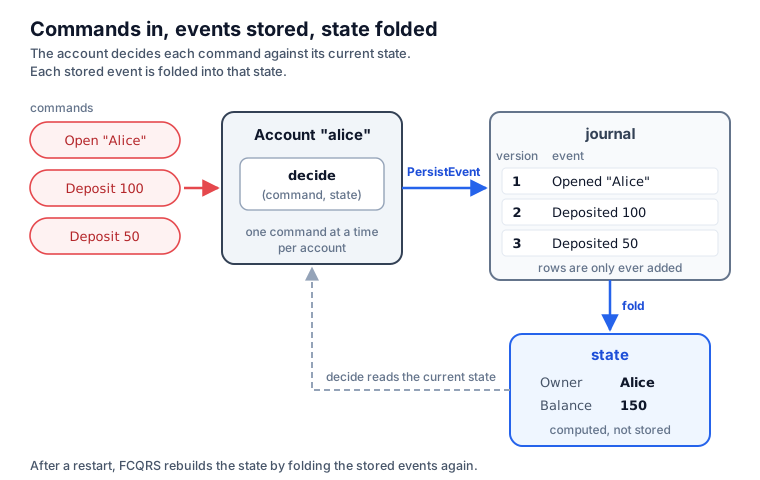
FCQRS stores the history itself. Every change becomes a row that is never updated, and the balance is computed from those rows.
Name the messages
module Account

open FCQRS.Common

// What a caller can ask an account to do.
type AccountCommand =
    | Open of owner: string
    | Deposit of amount: decimal

// What the account records when it accepts a command.
type AccountEvent =
    | Opened of owner: string
    | Deposited of amount: decimal

// What the account knows now, rebuilt from its events.
type AccountState = { Owner: string option; Balance: decimal }

// The state before the account's first event.
let initial = { Owner = None; Balance = 0m }
Fcqrs_250-tutorial_001-open-an-account.md_page.AccountFCQRSFCQRS.CommonContains common types like Events and Commands Functionality for Write Side.
Fcqrs_250-tutorial_001-open-an-account.md_page.Account.AccountCommandOpenowner: stringstringAn abbreviation for the CLI type . Basic Types
Depositamount: decimaldecimalAn abbreviation for the CLI type . Basic Types
Fcqrs_250-tutorial_001-open-an-account.md_page.Account.AccountEventOpenedDepositedFcqrs_250-tutorial_001-open-an-account.md_page.Account.AccountStateOwner: string optionoptionThe type of optional values. When used from other CLI languages the empty option is the null value. Use the constructors Some and None to create values of this type. Use the values in the Option module to manipulate values of this type, or pattern match against the values directly. 'None' values will appear as the value null to other CLI languages. Instance methods on this type will appear as static methods to other CLI languages due to the use of null as a value representation. Options
Balance: decimalinitial: AccountStateNoneThe representation of "No value"
// What a caller can ask an account to do.
public union AccountCommand(Open, Deposit);
public sealed record Open(string Owner);
public sealed record Deposit(decimal Amount);

// What the account records when it accepts a command.
public union AccountEvent(Opened, Deposited);
public sealed record Opened(string Owner);
public sealed record Deposited(decimal Amount);

// What the account knows now, rebuilt from its events.
public sealed record AccountState(string? Owner = null, decimal Balance = 0m);
- A command asks for a change:
Open "Alice",Deposit 100m. It is named as an instruction, because the account has not accepted it yet. - An event records a change that happened:
Opened "Alice",Deposited 100m. It is named in the past tense. - The state holds what the account needs to know now: its owner and its balance.
In C#, union (new in C# 15) declares a closed set of cases, as an F# union does: an AccountCommand
is an Open or a Deposit. A switch that misses a case gets a compiler warning, as an incomplete
match does in F#.
Write the rules
// Chooses what to do with a command: here, always store an event.
let decide (command: Command<AccountCommand>) (state: AccountState) =
    match command.CommandDetails with
    | Open owner -> PersistEvent(Opened owner)
    | Deposit amount -> PersistEvent(Deposited amount)

// Applies one stored event to the state.
let fold (event: Event<AccountEvent>) (state: AccountState) =
    match event.EventDetails with
    | Opened owner -> { state with Owner = Some owner }
    | Deposited amount -> { state with Balance = state.Balance + amount }
decide: Command<AccountCommand> -> AccountState -> EventAction<AccountEvent>command: Command<AccountCommand>FCQRS.Common.Command`1Represents a command to be processed by an aggregate actor. <typeparam name="'CommandDetails">The specific type of the command payload.</typeparam>
Fcqrs_250-tutorial_001-open-an-account.md_page.Account.AccountCommandstate: AccountStateFcqrs_250-tutorial_001-open-an-account.md_page.Account.AccountStateCommandDetails: 'CommandDetailsThe specific details or payload of the command.
Openowner: stringPersistEventPersist the event to the journal. The actor's state will be updated using the event handler *after* persistence succeeds.
OpenedDepositamount: decimalDepositedfold: Event<AccountEvent> -> AccountState -> AccountStateevent: Event<AccountEvent>FCQRS.Common.Event`1Represents an event generated by an aggregate actor as a result of processing a command. <typeparam name="'EventDetails">The specific type of the event payload.</typeparam>
Fcqrs_250-tutorial_001-open-an-account.md_page.Account.AccountEventEventDetails: 'EventDetailsThe specific details or payload of the event.
Owner: string optionBalance: decimalpublic sealed class Account
: Aggregate<AccountState, AccountCommand, AccountEvent>
{
// The name stored with every event of this aggregate.
public override string EntityName => "Account";
// The state before the account's first event.
public override AccountState InitialState => new();
// Chooses what to do with a command: here, always store an event.
public override EventAction<AccountEvent> HandleCommand(
Command<AccountCommand> command, AccountState state) =>
command.CommandDetails switch
{
Open open => Store(new Opened(open.Owner)),
Deposit deposit => Store(new Deposited(deposit.Amount))
};
// Applies one stored event to the state.
public override AccountState ApplyEvent(
Event<AccountEvent> stored, AccountState state) =>
stored.EventDetails switch
{
Opened opened => state with { Owner = opened.Owner },
Deposited deposited =>
state with { Balance = state.Balance + deposited.Amount }
};
// Stores the event and replies with it.
static EventAction<AccountEvent> Store(AccountEvent @event) =>
EventActions.Persist(@event);
}
decide (HandleCommand in C#) receives a command and the current state, and returns what to do.
PersistEvent means: store this event. In C#, the Store helper creates it with EventActions.Persist.
In this step every command is accepted. Step 2 adds rules that turn some commands away.
fold (ApplyEvent in C#) applies one stored event to the state. For Alice's three events:
start                  Owner: none    Balance: 0
fold Opened "Alice"    Owner: Alice   Balance: 0
fold Deposited 100     Owner: Alice   Balance: 100
fold Deposited 50      Owner: Alice   Balance: 150
FCQRS calls fold right after it stores an event. When it loads an account, for example after a
restart, it calls fold for every stored event of that account in order. That is how the balance
exists without a balance column.
The state, decide, and fold together form an aggregate. FCQRS keeps one aggregate instance per
account ID, and each instance handles one command at a time.
Start FCQRS and send commands
Shared setup
open System
open System.IO
open Microsoft.Extensions.Configuration
open Microsoft.Extensions.Logging
open FCQRS.Actor
open FCQRS.Common
open FCQRS.FSharp
open Account
let database = Path.Combine(AppContext.BaseDirectory, "accounts.db")
SystemIOMicrosoftExtensionsConfigurationLoggingFCQRSFCQRS.ActorFCQRS.CommonContains common types like Events and Commands Functionality for Write Side.
FCQRS.FSharpIdiomatic-F# functional facade for FCQRS. Gives F# consumers the same one-call ergonomics the C# host-builder (HostExtensions.fs) gives C#, but with F# idioms: records-of-functions for the definitions, typed handles for the results, an explicit wiring pipeline, and plain helpers for saga side effects. It is a *pure addition* that wraps only the existing primitives (IActor.InitializeActor / SagaBuilder.initSimple / Projections.startTracked / InitializeSagaStarter / CreateCommandSubscription / Actor.api) and changes nothing in the C# interop layer or the core. open FCQRS.FSharp let api = Fcqrs.actor config loggerFactory (Some (Fcqrs.connect DBType.Sqlite conn)) "Cluster" let documents = Fcqrs.aggregate api { Name="Document"; Initial=...; Decide=...; Fold=... } let slugs = Fcqrs.aggregate api { Name="Slug"; Initial=...; Decide=...; Fold=... } let publication = Fcqrs.saga api (publicationDef documents.Factory slugs.Factory) Fcqrs.wireSagaStarters api [ publication ] let subs = Fcqrs.projection api (Projection.single 0 updateReadModel) // (Projection.multi when you must control which notifications publish) // send a command and await the matching aggregate reply: let! ev = documents.Send (Fcqrs.newCid()) (Fcqrs.aggregateId id) cmd (fun e -> ...)
Fcqrs_250-tutorial_001-open-an-account.md_page.Accountdatabase: stringSystem.IO.PathPerforms operations on instances that contain file or directory path information. These operations are performed in a cross-platform manner.
Combine: string * string -> stringCombines two strings into a path. The first path to combine. The second path to combine. .NET Framework and .NET Core versions older than 2.1: or contains one or more of the invalid characters defined in . or is . The combined paths. If one of the specified paths is a zero-length string, this method returns the other path. If contains an absolute path, this method returns .
System.AppContextProvides members for setting and retrieving data about an application's context.
BaseDirectory: stringGets the file path of the base directory that the assembly resolver uses to probe for assemblies. The file path of the base directory that the assembly resolver uses to probe for assemblies.
// FCQRS logs through Microsoft.Extensions.Logging; this sample stays quiet.
let logging = LoggerFactory.Create(fun _ -> ())
// FCQRS reads optional settings from IConfiguration; this sample sets none.
let configuration = ConfigurationBuilder().Build()
// Events go to a SQLite file next to the program.
let connection = Fcqrs.connect DBType.Sqlite $"Data Source={database};"
let api = Fcqrs.actor configuration logging (Some connection) "accounts"

// Register the account rules; `accounts` sends commands to them.
let accounts =
    Fcqrs.aggregate api
        { Name = "Account"
          Initial = initial
          Decide = decide
          Fold = fold
          Snapshots = Default
          Passivation = PassivationPolicy.Default }

// Finish startup. This program has no sagas yet.
Fcqrs.wireSagaStarters api []
logging: ILoggerFactoryMicrosoft.Extensions.Logging.LoggerFactoryProduces instances of classes based on the given providers.
Create: Action<ILoggingBuilder> -> ILoggerFactoryCreates new instance of configured using provided delegate. A delegate to configure the . The that was created.
configuration: IConfigurationRoot``.ctor``: unit -> unitBuild: unit -> IConfigurationRootBuilds an with keys and values from the set of providers registered in . An with keys and values from the registered providers.
connection: ConnectionFCQRS.FSharp.Fcqrsconnect: DBType -> string -> ConnectionBuild a SQLite/etc. Connection from a raw connection string of any length.
FCQRS.Actor.DBTypeRepresents the type of database connection
SqliteSQLite using Microsoft.Data.Sqlite provider
api: IActoractor: IConfiguration -> ILoggerFactory -> Connection option -> string -> IActorCreate the actor system from plain values (cluster name as a string).
SomeThe representation of "Value of type 'T" The input value. An option representing the value.
accounts: AggregateHandle<AccountCommand,AccountEvent>aggregate: IActor -> Aggregate<'State,'Command,'Event> -> AggregateHandle<'Command,'Event>Register an aggregate and return its typed handle. Calling this IS the registration (it initializes the sharding region).
Name: stringInitial: 'Stateinitial: AccountStateDecide: Command<'Command> -> 'State -> EventAction<'Event>handleCommand (decide): command + current state -> what to do.
decide: Command<AccountCommand> -> AccountState -> EventAction<AccountEvent>Fold: Event<'Event> -> 'State -> 'StateapplyEvent (fold): event + current state -> next state (pure).
fold: Event<AccountEvent> -> AccountState -> AccountStateSnapshots: SnapshotPolicySnapshot cadence: Default (config / 30), NoSnapshots, or Every n.
DefaultUse the global config (config:akka:persistence:snapshot-version-count), or 30.
Passivation: PassivationPolicyIdle passivation: PassivationPolicy.Default (configuration, then Akka's 120s), After an idle period, or Never.
FCQRS.Common.PassivationPolicyIdle passivation for an aggregate type, set per entity at registration. Passivation stops an idle actor and releases its in-memory state; the next command recovers it from the journal. Only messages routed through cluster sharding count as activity. Sagas ignore this: their shard regions remember entities, which disables idle passivation in Akka.NET. A saga stops at StopSaga or abort instead.
DefaultUse configuration: `akka.cluster.sharding.<EntityName>.passivate-idle-entity-after`, then `akka.cluster.sharding.passivate-idle-entity-after`, then Akka.NET's 120s.
wireSagaStarters: IActor -> SagaHandle list -> unitWire every registered saga into one saga-starter (or the empty starter if none). Call after the aggregates + sagas are registered.
var builder = Host.CreateApplicationBuilder();
builder.Logging.ClearProviders();
// Events go to a SQLite file next to the program; register the account rules.
builder.Services.AddFcqrs($"Data Source={database};", "accounts")
    .AddAggregate<Account>();
using var host = builder.Build();
await host.StartAsync();
FCQRS stores events in a SQLite file, accounts.db. The aggregate is registered under the name
Account, which becomes part of every row it stores. In F#, Fcqrs.aggregate returns accounts, the
handle you send commands with. Snapshots and Passivation keep their defaults until step 3, and
wireSagaStarters completes startup; step 5 gives it a saga. In C#, AddFcqrs and AddAggregate do
the same inside the .NET host.
Shared setup
let describe event =
    match event with
    | Opened owner -> $"Opened for {owner}"
    | Deposited amount -> $"Deposited {amount}"
describe: AccountEvent -> stringevent: AccountEventOpenedowner: stringDepositedamount: decimal// Each account ID gets its own aggregate instance.
let alice = Fcqrs.aggregateId "alice"
// Send a command, wait for the stored event, and print it.
let send command =
let reply =
accounts.Send (Fcqrs.newCid ()) alice command (fun _ -> true)
|> Async.RunSynchronously
let description = describe reply.EventDetails
printfn $"{description} (version {reply.Version})"
send (Open "Alice")
send (Deposit 100m)
send (Deposit 50m)
alice: FCQRS.Model.Data.AggregateIdFCQRS.FSharp.FcqrsaggregateId: string -> FCQRS.Model.Data.AggregateIdAn aggregate id from a string (e.g. a document/user key). Any non-blank id works: the shard names entity actors Uri.EscapeDataString(entityId), so characters Akka actor names would reject directly (spaces, %) are escaped before they reach an actor path.
send: AccountCommand -> unitcommand: AccountCommandreply: Event<AccountEvent>accounts: AggregateHandle<AccountCommand,AccountEvent>Send: FCQRS.Model.Data.CID -> FCQRS.Model.Data.AggregateId -> 'Command -> ('Event -> bool) -> Async<Event<'Event>>Send a command and await the first matching aggregate event. Fails with SagaAlreadyStartedException, with nothing stored, when the command would start a saga that its correlation ID already started on this aggregate.
newCid: unit -> FCQRS.Model.Data.CIDA fresh correlation id (UUID v7).
(|>): 'T1 -> ('T1 -> 'U) -> 'UApply a function to a value, the value being on the left, the function on the right The argument. The function. The function result. let doubleIt x = x * 2 3 |> doubleIt // Evaluates to 6
Microsoft.FSharp.Control.FSharpAsyncHolds static members for creating and manipulating asynchronous computations. See also F# Language Guide - Async Workflows. Async Programming
RunSynchronously: Async<'T> * int option * Threading.CancellationToken option -> 'TRuns the asynchronous computation and await its result. If an exception occurs in the asynchronous computation then an exception is re-raised by this function. If no cancellation token is provided then the default cancellation token is used. The computation is started on the current thread if is null, has of true, and no timeout is specified. Otherwise the computation is started by queueing a new work item in the thread pool, and the current thread is blocked awaiting the completion of the computation. The timeout parameter is given in milliseconds. A value of -1 is equivalent to . The computation to run. The amount of time in milliseconds to wait for the result of the computation before raising a . If no value is provided for timeout then a default of -1 is used to correspond to . The cancellation token to be associated with the computation. If one is not supplied, the default cancellation token is used. The result of the computation. Starting Async Computations printfn "A" let result = async { printfn "B" do! Async.Sleep(1000) printfn "C" 17 } |> Async.RunSynchronously printfn "D" Prints "A", "B" immediately, then "C", "D" in 1 second. result is set to 17.
description: stringdescribe: AccountEvent -> stringEventDetails: 'EventDetailsThe specific details or payload of the event.
printfn: Printf.TextWriterFormat<'T> -> 'TPrint to stdout using the given format, and add a newline. The formatter. The formatted result. See Printf.printfn (link: ) for examples.
OpenDeposit// Sends commands to accounts and returns the event each one stored.
var accounts = host.Services
.GetRequiredService<Handler<AccountCommand, AccountEvent>>();
// Each account ID gets its own aggregate instance.
var alice = Values.CreateAggregateId("alice");
// Send a command, wait for the stored event, and print it.
async Task Send(AccountCommand command)
{
var reply = await accounts(_ => true, Values.NewCID(), alice, command);
var description = Describe(reply.EventDetails);
Console.WriteLine($"{description} (version {reply.Version})");
}
await Send(new Open("Alice"));
await Send(new Deposit(100m));
await Send(new Deposit(50m));
alice selects Alice's account. Sending waits for the account's reply, which is the event it stored,
and prints it with its version: the number of events the account has stored so far. Two arguments
come back in step 4: Fcqrs.newCid () / Values.NewCID() labels the request, and fun _ -> true /
_ => true accepts any reply.
Run it
With the .NET 11 SDK and Git installed:
git clone https://github.com/OnurGumus/FCQRS.git
cd FCQRS/samples/accounts
dotnet run --project 1-open-an-account/fsharp
git clone https://github.com/OnurGumus/FCQRS.git
cd FCQRS/samples/accounts
dotnet run --project 1-open-an-account/csharp
Run the tutorial's programs from samples/accounts. Its global.json selects the .NET 11 SDK, which
the C# programs need for C# 15. At the time of writing, that SDK is a release candidate.
Opened for Alice (version 1)
Deposited 100 (version 2)
Deposited 50 (version 3)

Journal rows for Account/default-shard/alice:
  1  {"Case":"Opened","owner":"Alice"}
  2  {"Case":"Deposited","amount":100}
  3  {"Case":"Deposited","amount":50}
Opened for Alice (version 1)
Deposited 100 (version 2)
Deposited 50 (version 3)

Journal rows for Account/default-shard/alice:
  1  {"$case":"Opened","$value":{"Owner":"Alice"}}
  2  {"$case":"Deposited","$value":{"Amount":100}}
  3  {"$case":"Deposited","$value":{"Amount":50}}
The first three lines are the replies. The rest is the journal: the database table FCQRS stores
events in. It has one row per event, in the order the events happened, and rows are only ever added.
Account/default-shard/alice identifies Alice's account in the journal. Each row holds an event's
version and the event as stored. A stored event names its case, such as Opened, so the names of
event cases are part of what FCQRS stores. The program reads the table only to show it to you. Applications read events through projections,
which step 4 introduces.
The journal has no balance. The balance, 150, is in the account's state, computed by fold.
Run it again
Opened for Alice (version 4)
Deposited 100 (version 5)
Deposited 50 (version 6)
The versions continue at 4. Before handling the new commands, FCQRS loaded Alice's account by folding
its three stored events, so the account started this run with a balance of 150. The journal now has six
rows, including a second Opened: nothing stops an account from opening twice yet.
Next
Step 2: Withdraw money adds rules to decide: an account opens once, only an
open account takes money, and a withdrawal cannot overdraw the account.