
Step 3: Restart the bank
When you ran steps 1 and 2 again, the versions continued where the last run stopped. Before the first
command, FCQRS loaded the account by folding its stored events. This step shows when an account loads,
how a snapshot shortens loading for a long history, and what loading requires from fold.
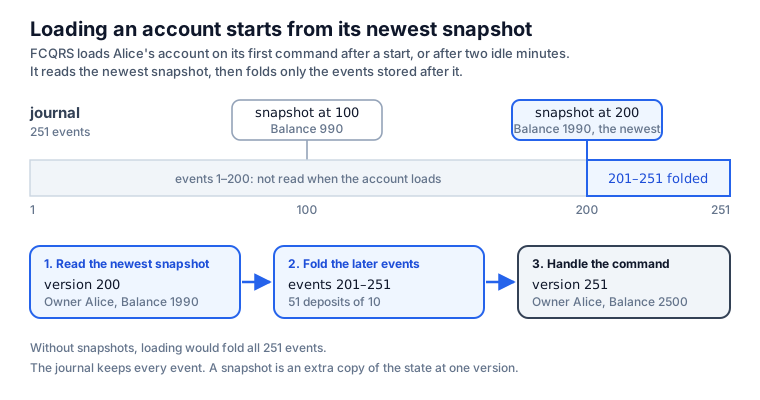
When an account loads
FCQRS keeps an account in memory while it receives commands. It loads the account from the database:
- on the account's first command after the program starts;
- on its first command after two idle minutes. FCQRS removes an account from memory when it has received no commands for that long, which is called passivation. In a cluster, an account also loads again when it moves to another node.
Loading starts from the initial state and folds the account's stored events in order. Commands after
that use the state in memory, so an account pays the cost of loading once per load, not once per
command. The registration's Passivation = PassivationPolicy.Default keeps the two-minute limit, and
a C# aggregate class inherits the same default. PassivationPolicy.After (NewAfter in C#) sets
another idle time, and PassivationPolicy.Never keeps an account in memory until the program stops.
Loading compared with a CRUD read
A CRUD application stores the balance in a column, so reading an account costs one row however long its history is:
-- The balance is a column: one row.
SELECT owner, balance FROM accounts WHERE id = 'alice';
Without snapshots, loading an account with 10,000 events folds 10,000 events. A snapshot bounds that work: FCQRS saves the account's state every so many events, and loading starts from the newest snapshot. After this step's first run, loading Alice's account reads the equivalent of these two queries:
-- The newest snapshot: Alice's state at version 200.
SELECT sequence_number, snapshot FROM snapshot
WHERE persistence_id = 'Account/default-shard/alice'
ORDER BY sequence_number DESC LIMIT 1;
-- The events stored after it, folded in order.
SELECT sequence_number, message FROM journal
WHERE persistence_id = 'Account/default-shard/alice'
  AND sequence_number > 200
ORDER BY sequence_number;
Save a snapshot every 100 events
Shared setup
module Account =
    open FCQRS.Common

    // What a caller can ask an account to do.
    type AccountCommand =
        | Open of owner: string
        | Deposit of amount: decimal
        | Withdraw of amount: decimal

    // What the account replies. Rejected is a reply only: it is never stored.
    type AccountEvent =
        | Opened of owner: string
        | Deposited of amount: decimal
        | Withdrawn of amount: decimal
        | Rejected of reason: string

    // What the account knows now, rebuilt from its events.
    type AccountState = { Owner: string option; Balance: decimal }

    // The state before the account's first event.
    let initial = { Owner = None; Balance = 0m }

    // Chooses what to do with a command, based on the current state.
    let decide (command: Command<AccountCommand>) (state: AccountState) =
        match command.CommandDetails, state.Owner with
        | Open _, Some _ -> DeferEvent(Rejected "The account is already open")
        | Open owner, None -> PersistEvent(Opened owner)
        | _, None -> DeferEvent(Rejected "The account is not open")
        | (Deposit amount | Withdraw amount), _ when amount <= 0m ->
            DeferEvent(Rejected "The amount must be positive")
        | Deposit amount, _ -> PersistEvent(Deposited amount)
        | Withdraw amount, _ when amount > state.Balance ->
            DeferEvent(Rejected $"Insufficient funds: {state.Balance} available")
        | Withdraw amount, _ -> PersistEvent(Withdrawn amount)

    // Applies one event to the state. A rejection changes nothing.
    let fold (event: Event<AccountEvent>) (state: AccountState) =
        match event.EventDetails with
        | Opened owner -> { state with Owner = Some owner }
        | Deposited amount -> { state with Balance = state.Balance + amount }
        | Withdrawn amount -> { state with Balance = state.Balance - amount }
        | Rejected _ -> state
open System
open System.IO
open Microsoft.Extensions.Configuration
open Microsoft.Extensions.Logging
open FCQRS.Actor
open FCQRS.Common
open FCQRS.FSharp
open Account
let database = Path.Combine(AppContext.BaseDirectory, "accounts.db")

// Startup is the same as in step 1.
let logging = LoggerFactory.Create(fun _ -> ())
let configuration = ConfigurationBuilder().Build()
let connection = Fcqrs.connect DBType.Sqlite $"Data Source={database};"
let api = Fcqrs.actor configuration logging (Some connection) "accounts"
Fcqrs_250-tutorial_003-restart-the-bank.md_page.AccountFCQRSFCQRS.CommonContains common types like Events and Commands Functionality for Write Side.
Fcqrs_250-tutorial_003-restart-the-bank.md_page.Account.AccountCommandOpenowner: stringstringAn abbreviation for the CLI type . Basic Types
Depositamount: decimaldecimalAn abbreviation for the CLI type . Basic Types
WithdrawFcqrs_250-tutorial_003-restart-the-bank.md_page.Account.AccountEventOpenedDepositedWithdrawnRejectedreason: stringFcqrs_250-tutorial_003-restart-the-bank.md_page.Account.AccountStateOwner: string optionoptionThe type of optional values. When used from other CLI languages the empty option is the null value. Use the constructors Some and None to create values of this type. Use the values in the Option module to manipulate values of this type, or pattern match against the values directly. 'None' values will appear as the value null to other CLI languages. Instance methods on this type will appear as static methods to other CLI languages due to the use of null as a value representation. Options
Balance: decimalinitial: AccountStateNoneThe representation of "No value"
decide: Command<AccountCommand> -> AccountState -> EventAction<AccountEvent>command: Command<AccountCommand>FCQRS.Common.Command`1Represents a command to be processed by an aggregate actor. <typeparam name="'CommandDetails">The specific type of the command payload.</typeparam>
state: AccountStateCommandDetails: 'CommandDetailsThe specific details or payload of the command.
SomeThe representation of "Value of type 'T" The input value. An option representing the value.
DeferEventPublish and fold the event in the live actor without storing it or incrementing the persisted version. A deferred event does not start a saga; running sagas still receive it.
PersistEventPersist the event to the journal. The actor's state will be updated using the event handler *after* persistence succeeds.
(<=): 'T -> 'T -> boolStructural less-than-or-equal comparison The first parameter. The second parameter. The result of the comparison. 5 <= 1 // Evaluates to false 5 <= 5 // Evaluates to true [1; 5] <= [1; 6] // Evaluates to true
(>): 'T -> 'T -> boolStructural greater-than The first parameter. The second parameter. The result of the comparison. 5 > 1 // Evaluates to true 5 > 5 // Evaluates to false (1, "a") > (1, "z") // Evaluates to false
fold: Event<AccountEvent> -> AccountState -> AccountStateevent: Event<AccountEvent>FCQRS.Common.Event`1Represents an event generated by an aggregate actor as a result of processing a command. <typeparam name="'EventDetails">The specific type of the event payload.</typeparam>
EventDetails: 'EventDetailsThe specific details or payload of the event.
SystemIOMicrosoftExtensionsConfigurationLoggingFCQRS.ActorFCQRS.FSharpIdiomatic-F# functional facade for FCQRS. Gives F# consumers the same one-call ergonomics the C# host-builder (HostExtensions.fs) gives C#, but with F# idioms: records-of-functions for the definitions, typed handles for the results, an explicit wiring pipeline, and plain helpers for saga side effects. It is a *pure addition* that wraps only the existing primitives (IActor.InitializeActor / SagaBuilder.initSimple / Projections.startTracked / InitializeSagaStarter / CreateCommandSubscription / Actor.api) and changes nothing in the C# interop layer or the core. open FCQRS.FSharp let api = Fcqrs.actor config loggerFactory (Some (Fcqrs.connect DBType.Sqlite conn)) "Cluster" let documents = Fcqrs.aggregate api { Name="Document"; Initial=...; Decide=...; Fold=... } let slugs = Fcqrs.aggregate api { Name="Slug"; Initial=...; Decide=...; Fold=... } let publication = Fcqrs.saga api (publicationDef documents.Factory slugs.Factory) Fcqrs.wireSagaStarters api [ publication ] let subs = Fcqrs.projection api (Projection.single 0 updateReadModel) // (Projection.multi when you must control which notifications publish) // send a command and await the matching aggregate reply: let! ev = documents.Send (Fcqrs.newCid()) (Fcqrs.aggregateId id) cmd (fun e -> ...)
database: stringSystem.IO.PathPerforms operations on instances that contain file or directory path information. These operations are performed in a cross-platform manner.
Combine: string * string -> stringCombines two strings into a path. The first path to combine. The second path to combine. .NET Framework and .NET Core versions older than 2.1: or contains one or more of the invalid characters defined in . or is . The combined paths. If one of the specified paths is a zero-length string, this method returns the other path. If contains an absolute path, this method returns .
System.AppContextProvides members for setting and retrieving data about an application's context.
BaseDirectory: stringGets the file path of the base directory that the assembly resolver uses to probe for assemblies. The file path of the base directory that the assembly resolver uses to probe for assemblies.
logging: ILoggerFactoryMicrosoft.Extensions.Logging.LoggerFactoryProduces instances of classes based on the given providers.
Create: Action<ILoggingBuilder> -> ILoggerFactoryCreates new instance of configured using provided delegate. A delegate to configure the . The that was created.
configuration: IConfigurationRoot``.ctor``: unit -> unitBuild: unit -> IConfigurationRootBuilds an with keys and values from the set of providers registered in . An with keys and values from the registered providers.
connection: ConnectionFCQRS.FSharp.Fcqrsconnect: DBType -> string -> ConnectionBuild a SQLite/etc. Connection from a raw connection string of any length.
FCQRS.Actor.DBTypeRepresents the type of database connection
SqliteSQLite using Microsoft.Data.Sqlite provider
api: IActoractor: IConfiguration -> ILoggerFactory -> Connection option -> string -> IActorCreate the actor system from plain values (cluster name as a string).
// Register the account rules and save a snapshot every 100 events.
let accounts =
    Fcqrs.aggregate api
        { Name = "Account"
          Initial = initial
          Decide = decide
          Fold = fold
          Snapshots = Every 100
          Passivation = PassivationPolicy.Default }
accounts: AggregateHandle<AccountCommand,AccountEvent>FCQRS.FSharp.Fcqrsaggregate: IActor -> Aggregate<'State,'Command,'Event> -> AggregateHandle<'Command,'Event>Register an aggregate and return its typed handle. Calling this IS the registration (it initializes the sharding region).
api: IActorName: stringInitial: 'Stateinitial: AccountStateDecide: Command<'Command> -> 'State -> EventAction<'Event>handleCommand (decide): command + current state -> what to do.
decide: Command<AccountCommand> -> AccountState -> EventAction<AccountEvent>Fold: Event<'Event> -> 'State -> 'StateapplyEvent (fold): event + current state -> next state (pure).
fold: Event<AccountEvent> -> AccountState -> AccountStateSnapshots: SnapshotPolicySnapshot cadence: Default (config / 30), NoSnapshots, or Every n.
EverySnapshot every N versions (N > 0; invalid values fall back to Default).
Passivation: PassivationPolicyIdle passivation: PassivationPolicy.Default (configuration, then Akka's 120s), After an idle period, or Never.
FCQRS.Common.PassivationPolicyIdle passivation for an aggregate type, set per entity at registration. Passivation stops an idle actor and releases its in-memory state; the next command recovers it from the journal. Only messages routed through cluster sharding count as activity. Sagas ignore this: their shard regions remember entities, which disables idle passivation in Akka.NET. A saga stops at StopSaga or abort instead.
DefaultUse configuration: `akka.cluster.sharding.<EntityName>.passivate-idle-entity-after`, then `akka.cluster.sharding.passivate-idle-entity-after`, then Akka.NET's 120s.
// Save a snapshot of the state every 100 events.
public override SnapshotPolicy SnapshotPolicy => SnapshotPolicy.NewEvery(100);
Snapshots = Every 100 in the F# registration, like the SnapshotPolicy override on the C# Account
class, saves the account's state after each event whose version is a multiple of 100. Default saves one every 30 events: steps 1 and 2 used it,
but neither stored 30 events. NoSnapshots stops saving new snapshots, although loading still uses a
snapshot saved earlier.
The account's rules are the ones from step 2.
Send 250 deposits
Shared setup
Fcqrs.wireSagaStarters api []

let describe event =
    match event with
    | Opened owner -> $"Opened for {owner}"
    | Deposited amount -> $"Deposited {amount}"
    | Withdrawn amount -> $"Withdrew {amount}"
    | Rejected reason -> $"Rejected: {reason}"
FCQRS.FSharp.FcqrswireSagaStarters: IActor -> SagaHandle list -> unitWire every registered saga into one saga-starter (or the empty starter if none). Call after the aggregates + sagas are registered.
api: IActordescribe: AccountEvent -> stringevent: AccountEventOpenedowner: stringDepositedamount: decimalWithdrawnRejectedreason: stringlet alice = Fcqrs.aggregateId "alice"
// Send a command and wait for the account's reply.
let request command =
accounts.Send (Fcqrs.newCid ()) alice command (fun _ -> true)
|> Async.RunSynchronously
let show (reply: Event<AccountEvent>) =
let description = describe reply.EventDetails
printfn $"{description} (version {reply.Version})"
show (request (Open "Alice"))
// Deposit 10, 250 times, and print the last reply.
let replies = [ for _ in 1 .. 250 -> request (Deposit 10m) ]
show (List.last replies)
alice: FCQRS.Model.Data.AggregateIdFCQRS.FSharp.FcqrsaggregateId: string -> FCQRS.Model.Data.AggregateIdAn aggregate id from a string (e.g. a document/user key). Any non-blank id works: the shard names entity actors Uri.EscapeDataString(entityId), so characters Akka actor names would reject directly (spaces, %) are escaped before they reach an actor path.
request: AccountCommand -> Event<AccountEvent>command: AccountCommandaccounts: AggregateHandle<AccountCommand,AccountEvent>Send: FCQRS.Model.Data.CID -> FCQRS.Model.Data.AggregateId -> 'Command -> ('Event -> bool) -> Async<Event<'Event>>Send a command and await the first matching aggregate event. Fails with SagaAlreadyStartedException, with nothing stored, when the command would start a saga that its correlation ID already started on this aggregate.
newCid: unit -> FCQRS.Model.Data.CIDA fresh correlation id (UUID v7).
(|>): 'T1 -> ('T1 -> 'U) -> 'UApply a function to a value, the value being on the left, the function on the right The argument. The function. The function result. let doubleIt x = x * 2 3 |> doubleIt // Evaluates to 6
Microsoft.FSharp.Control.FSharpAsyncHolds static members for creating and manipulating asynchronous computations. See also F# Language Guide - Async Workflows. Async Programming
RunSynchronously: Async<'T> * int option * Threading.CancellationToken option -> 'TRuns the asynchronous computation and await its result. If an exception occurs in the asynchronous computation then an exception is re-raised by this function. If no cancellation token is provided then the default cancellation token is used. The computation is started on the current thread if is null, has of true, and no timeout is specified. Otherwise the computation is started by queueing a new work item in the thread pool, and the current thread is blocked awaiting the completion of the computation. The timeout parameter is given in milliseconds. A value of -1 is equivalent to . The computation to run. The amount of time in milliseconds to wait for the result of the computation before raising a . If no value is provided for timeout then a default of -1 is used to correspond to . The cancellation token to be associated with the computation. If one is not supplied, the default cancellation token is used. The result of the computation. Starting Async Computations printfn "A" let result = async { printfn "B" do! Async.Sleep(1000) printfn "C" 17 } |> Async.RunSynchronously printfn "D" Prints "A", "B" immediately, then "C", "D" in 1 second. result is set to 17.
show: Event<AccountEvent> -> unitreply: Event<AccountEvent>FCQRS.Common.Event`1Represents an event generated by an aggregate actor as a result of processing a command. <typeparam name="'EventDetails">The specific type of the event payload.</typeparam>
Fcqrs_250-tutorial_003-restart-the-bank.md_page.Account.AccountEventdescription: stringdescribe: AccountEvent -> stringEventDetails: 'EventDetailsThe specific details or payload of the event.
printfn: Printf.TextWriterFormat<'T> -> 'TPrint to stdout using the given format, and add a newline. The formatter. The formatted result. See Printf.printfn (link: ) for examples.
Openreplies: Event<AccountEvent> list(..): ^T -> ^T -> ^T seqThe standard overloaded range operator, e.g. [n..m] for lists, seq {n..m} for sequences The start value of the range. The end value of the range. The sequence spanning the range. [1..4] // Evaluates to [1; 2; 3; 4] [1.5..4.4] // Evaluates to [1.5; 2.5; 3.5] ['a'..'d'] // Evaluates to ['a'; 'b'; 'c'; 'd'] [|1..4|] // Evaluates to an array [|1; 2; 3; 4|] { 1..4 } // Evaluates to a sequence [1; 2; 3; 4])
DepositMicrosoft.FSharp.Collections.ListModuleContains operations for working with values of type . Operations for collections such as lists, arrays, sets, maps and sequences. See also F# Collection Types in the F# Language Guide.
last: 'T list -> 'TReturns the last element of the list. The input list. The last element of the list. Thrown when the input does not have any elements. [ "pear"; "banana" ] |> List.last Evaluates to banana [ ] |> List.last Throws ArgumentException
// Sends commands to accounts and returns the event each one replied with.
var accounts = host.Services
    .GetRequiredService<Handler<AccountCommand, AccountEvent>>();
var alice = Values.CreateAggregateId("alice");

// Send a command and wait for the account's reply.
Task<Event<AccountEvent>> Request(AccountCommand command) =>
    accounts(_ => true, Values.NewCID(), alice, command);

void Show(Event<AccountEvent> reply)
{
    var description = Describe(reply.EventDetails);
    Console.WriteLine($"{description} (version {reply.Version})");
}

Show(await Request(new Open("Alice")));

// Deposit 10, 250 times, and print the last reply.
var replies = new List<Event<AccountEvent>>();
for (var i = 0; i < 250; i++)
    replies.Add(await Request(new Deposit(10m)));
Show(replies[^1]);
Run it
From samples/accounts:
dotnet run --project 3-restart-the-bank/fsharp
dotnet run --project 3-restart-the-bank/csharp
Both programs print:
Opened for Alice (version 1)
Deposited 10 (version 251)

Journal: 251 events for Account/default-shard/alice
Snapshots:
  version 100  {"Owner":"Alice","Balance":990}
  version 200  {"Owner":"Alice","Balance":1990}
The journal still holds all 251 events. A snapshot is an extra row that stores the account's state at
one version as JSON: at version 200, Alice's account held one Opened and 199 deposits of 10.
FCQRS saves a snapshot in the background after it replies, so the reply to the 200th command does not wait for it. The program waits for the snapshot rows before it prints them, and it reads these tables only to show them.
Run it again
Rejected: The account is already open (version 251)
Deposited 10 (version 501)

Journal: 501 events for Account/default-shard/alice
Snapshots:
  version 100  {"Owner":"Alice","Balance":990}
  version 200  {"Owner":"Alice","Balance":1990}
  version 300  {"Owner":"Alice","Balance":2990}
  version 400  {"Owner":"Alice","Balance":3990}
  version 500  {"Owner":"Alice","Balance":4990}
To handle the first command, Open, FCQRS loaded Alice's account from the snapshot at version 200 and
folded the 51 events after it, instead of all 251. FCQRS keeps every event and every snapshot. Loading
uses the newest snapshot.
What loading requires from fold
fold runs when FCQRS stores an event and again every time the account loads, possibly months later
in a newer version of the program. Each run must produce the same state, so fold may use only the
previous state and the event. A fold that reads the clock, a random number, a configuration value,
or a database can produce a different state on each load.
For example, a fold that subtracted a withdrawal fee read from configuration would change past
balances when the fee changed: every account would load with the new fee applied to its old
withdrawals. Compute the fee in decide, which runs once per command, and store it in the event.
fold then applies what the event records.
When the state or fold changes
A snapshot stores the result of fold under the name of the state type. Changing AccountState, or
what fold computes, affects the snapshots already stored:
- An account loaded from an old snapshot keeps what the old
foldcomputed for the events before that snapshot. - If FCQRS cannot read the newest snapshot, for example because
AccountStatewas renamed, it stops the process withProcess terminated due to deserialization errorwhen the account loads.
The journal still holds every event, so the snapshots can go. Stop the program, delete the aggregate's snapshots, and start the new version. Each account's next load folds its whole history with the new code:
DELETE FROM snapshot WHERE persistence_id LIKE 'Account/%';
Evolve persisted events covers keeping snapshots compatible instead.
Next
Step 4: Show a statement builds a statement for Alice: a read model with her transactions and balance, updated from the journal.